



Here's how it works



How to use or fill out SSA 521 with our platform

- Click ‘Get Form’ to open the SSA 521 in the editor.
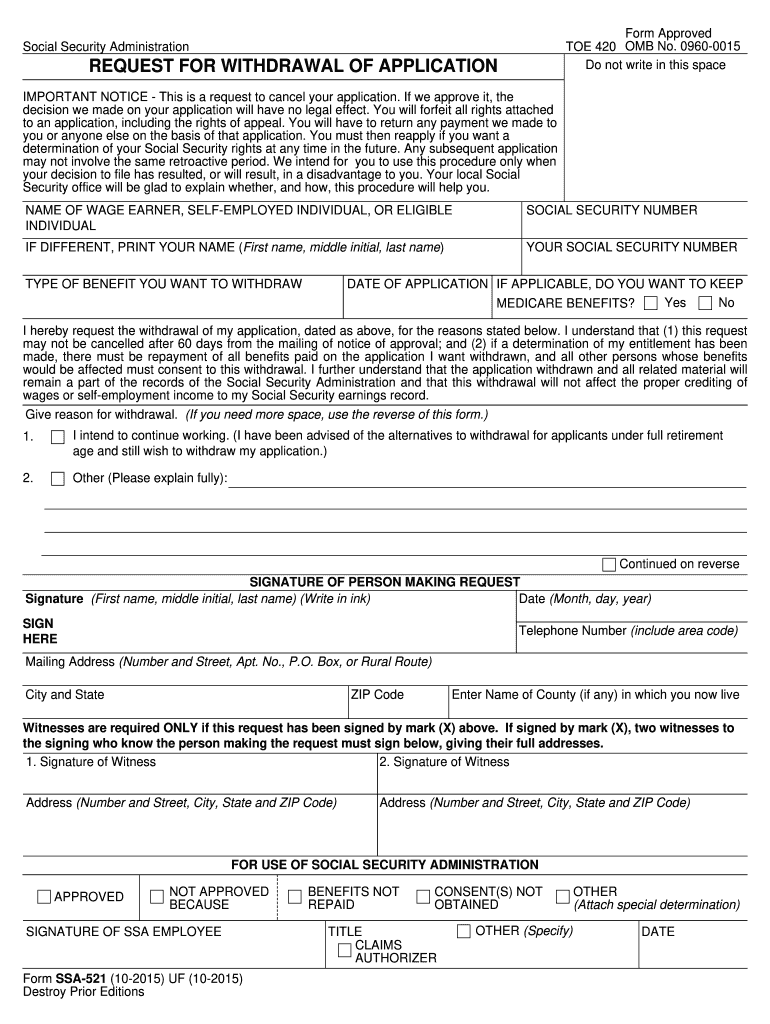
- Begin by entering the name of the wage earner or eligible individual in the designated field. Ensure accuracy as this is crucial for processing your request.
- Input the Social Security Number of the individual listed above. If applicable, provide your own name and Social Security Number if it differs from the first entry.
- Select the type of benefit you wish to withdraw by checking the appropriate box. If you want to keep Medicare benefits, indicate 'Yes' or 'No' as required.
- In the section for reasons for withdrawal, clearly state your reason. If more space is needed, utilize the reverse side of the form.
- Sign and date the form where indicated. Include your telephone number and mailing address for any follow-up communication.
- If signed by mark (X), ensure two witnesses sign below with their addresses included.
Start using our platform today to fill out your SSA 521 form online for free!
It's free
See more ssa 521 versions
Got questions?
What do I need to sign my form ssa 521 instructions electronically?
Electronic document approval requires a software solution that works in compliance with data security and eSignature regulations. DocHub is a great tool for that, as it meets all the above mentioned requirements. Whatever method you like to sign your form ssa 521 instructions in DocHub, your eSignature will be legally binding and court-admissible.
How to complete and sign fsa 521 form online?
You may easily complete, modify, and even eSign your fsa 521 form using DocHub. Create a new account and begin your free trial. After that, you may add the file with the form and simply make all the required edits. No need to print on paper or use a third-party application to sign it, as you can put your electronic signature on your document quicker through DocHub.
Is there really a $16728 Social Security bonus?
What is a SSA 795 form used for?
Who is eligible for Social Security bonus?
Security and compliance
At DocHub, your data security is our priority. We follow HIPAA, SOC2, GDPR, and other standards, so you can work on your documents with confidence.
Learn more