




Here's how it works



How to use or fill out OW-8-ES 2014 form with our platform

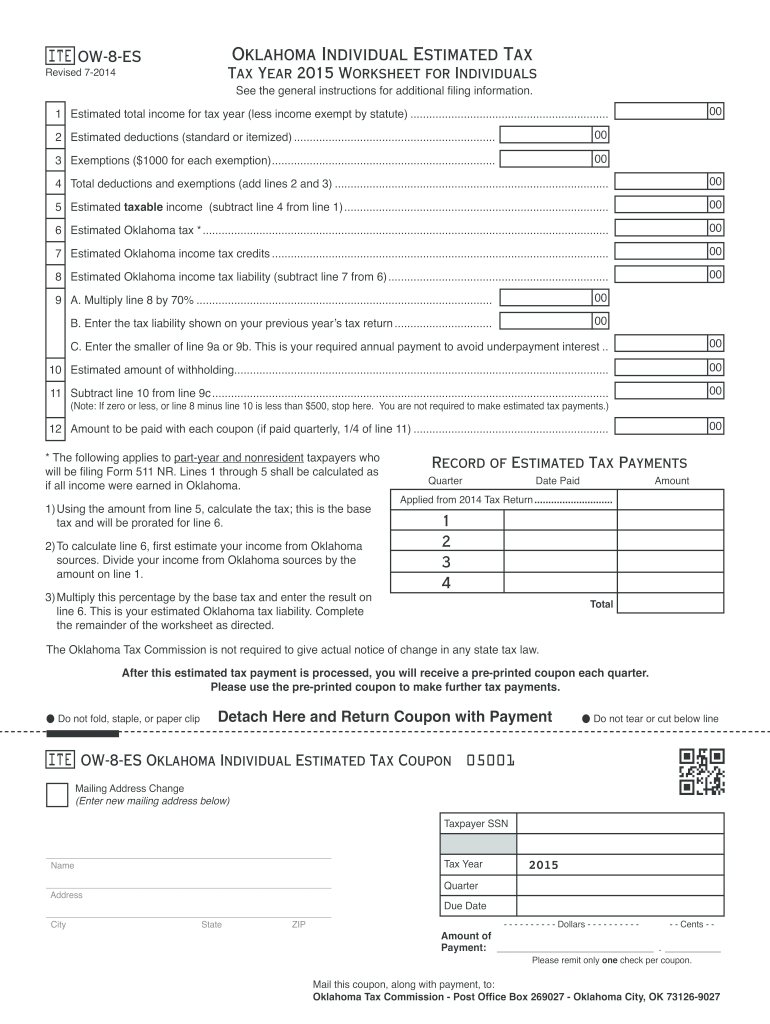
- Click ‘Get Form’ to open the OW-8-ES 2014 form in the editor.
- Begin by entering your estimated total income for the tax year on line 1, ensuring you exclude any income exempt by statute.
- On line 2, input your estimated deductions, whether standard or itemized. This will help in calculating your taxable income.
- Next, list your exemptions on line 3. Remember, you can claim $1000 for each exemption.
- Add lines 2 and 3 together on line 4 to find your total deductions and exemptions.
- Calculate your estimated taxable income by subtracting line 4 from line 1 and enter this amount on line 5.
- Proceed to calculate your estimated Oklahoma tax on line 6 based on the taxable income you've just calculated.
- Continue filling out the remaining fields as instructed, ensuring accuracy to avoid underpayment penalties.
Start using our platform today for free to simplify your form completion process!
It's free
See more ow 8 es 2014 form versions
Got questions?
Can I sign my ow 8 es 2014 form on a mobile?
Sure, you’ll find numerous apps for this on the web. Nevertheless, if you need to eSign your ow 8 es 2014 form without installing additional software, DocHub is the optimum choice you can make. This powerful editor works on mobile devices just as on desktops. Open our editor in any internet browser, register or sign in to your account, and start managing your documents.
How do you get ow 8 es 2014 form for my state?
If you are looking for a state-specific ow 8 es 2014 form sample, you can find it in our DocHub Forms & Templates catalog. Use the search field, enter your form’s name, and search through the results for your state. You can also filter out irrelevant results while searching our catalog by categories.
Security and compliance
At DocHub, your data security is our priority. We follow HIPAA, SOC2, GDPR, and other standards, so you can work on your documents with confidence.
Learn more


