01. Edit your new mexico cit 1 instructions 2021 online
Type text, add images, blackout confidential details, add comments, highlights and more.
02. Sign it in a few clicks
Draw your signature, type it, upload its image, or use your mobile device as a signature pad.
03. Share your form with others
Send new mexico state income tax via email, link, or fax. You can also download it, export it or print it out.
How to use or fill out nm cit 2014 form with our platform
Ease of Setup
DocHub User Ratings on G2
Ease of Use
DocHub User Ratings on G2
Click ‘Get Form’ to open the nm cit 2014 form in the editor.
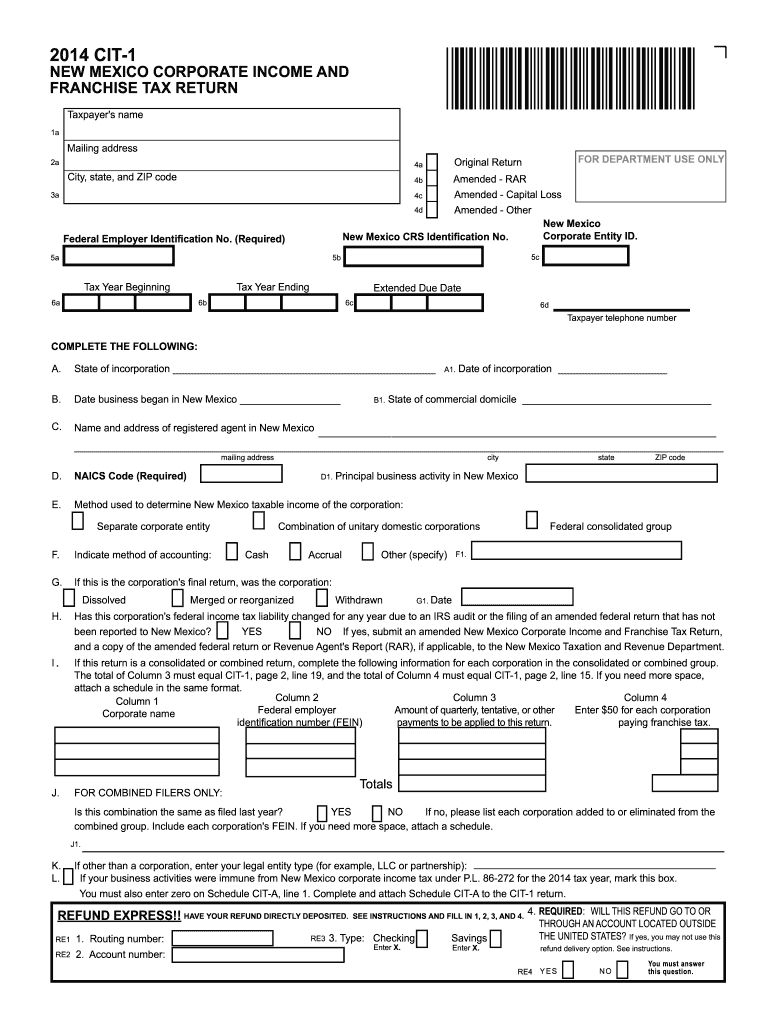
Begin by entering your Taxpayer's name and mailing address in the designated fields. Ensure accuracy as this information is crucial for identification.
Complete the sections regarding your New Mexico Corporate Entity ID and Federal Employer Identification Number (FEIN). These identifiers are essential for processing your return.
Fill out the tax year details, including the beginning and ending dates. This helps establish the period for which you are filing.
Proceed to complete sections A through H, providing information about your business activities, accounting methods, and any changes due to IRS audits. Each section has specific requirements that must be met.
For combined filers, ensure you accurately report all corporations involved in your group. Use our platform’s features to attach additional schedules if necessary.
Finally, review all entries for accuracy before submitting. Utilize our platform’s editing tools to make any necessary adjustments easily.
Start filling out your nm cit 2014 form today using our platform for free!
Nm cit 2014 form pdfNM form CIT-1 instructions 2024NM CIT instructions 2024Nm cit 2014 form instructionsNm cit 2014 form downloadNm cit 2014 form onlineNM CIT-1 instructions 2025Nm tax forms
Security and compliance
At DocHub, your data security is our priority. We follow HIPAA, SOC2, GDPR, and other standards, so you can work on your documents with confidence.
Taxpayers filing the New Mexico Personal Income Tax Return, PIT-1, must: Complete the name and address of the taxpayer, the filing status, and the socialRead more
Special thanks go to New Mexicos law enforcement officers for their work in documenting traffic- related crash data using the NM state Uniform Crash Report (Read more
Cookie consent notice
This site uses cookies to enhance site navigation and personalize your experience.
By using this site you agree to our use of cookies as described in our Privacy Notice.
You can modify your selections by visiting our Cookie and Advertising Notice.