Type text, add images, blackout confidential details, add comments, highlights and more.
02. Sign it in a few clicks
Draw your signature, type it, upload its image, or use your mobile device as a signature pad.
03. Share your form with others
Send dr1059 via email, link, or fax. You can also download it, export it or print it out.
How to use or fill out DR 1059 - colorado with our platform
Ease of Setup
DocHub User Ratings on G2
Ease of Use
DocHub User Ratings on G2
Click ‘Get Form’ to open the DR 1059 in the editor.
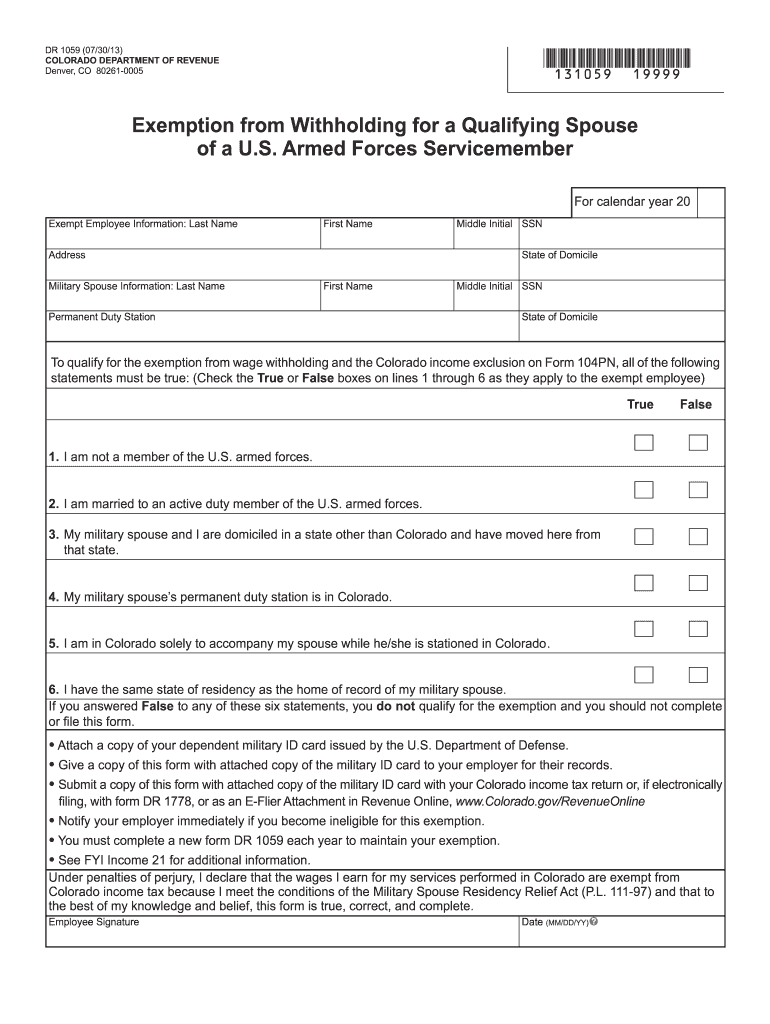
Begin by filling in your Exempt Employee Information. Enter your last name, first name, middle initial, and Social Security Number (SSN). Then provide your address.
Next, complete the Military Spouse Information section. Input your spouse's last name, first name, middle initial, SSN, and their permanent duty station along with their state of domicile.
Review the six statements regarding eligibility for exemption. Check 'True' or 'False' for each statement based on your situation. Ensure you meet all conditions to qualify.
Attach a copy of your dependent military ID card issued by the U.S. Department of Defense as required.
Once completed, save the form and share it with your employer for their records. If filing electronically, ensure to submit it alongside your Colorado income tax return or as specified.
Start using our platform today to easily fill out and manage your DR 1059 form for free!
Dr. Craig Webb has been on the clinic floor at the CSU VTH for over 2 decades, as he very much enjoys working with and learning from bright DVM students,Read more
Technical Protocol for Evaluating Natural Attenuation of
The information in this document was developed through a collaboration between the U.S.. EPA (Subsurface Protection and Remediation Division, National RiskRead more
Cookie consent notice
This site uses cookies to enhance site navigation and personalize your experience.
By using this site you agree to our use of cookies as described in our Privacy Notice.
You can modify your selections by visiting our Cookie and Advertising Notice.