Type text, add images, blackout confidential details, add comments, highlights and more.

02. Sign it in a few clicks
Draw your signature, type it, upload its image, or use your mobile device as a signature pad.

03. Share your form with others
Send 1116 form via email, link, or fax. You can also download it, export it or print it out.

How to use or fill out form 1116 with our platform
Ease of Setup
DocHub User Ratings on G2
Ease of Use
DocHub User Ratings on G2
Click ‘Get Form’ to open Form 1116 in the editor.
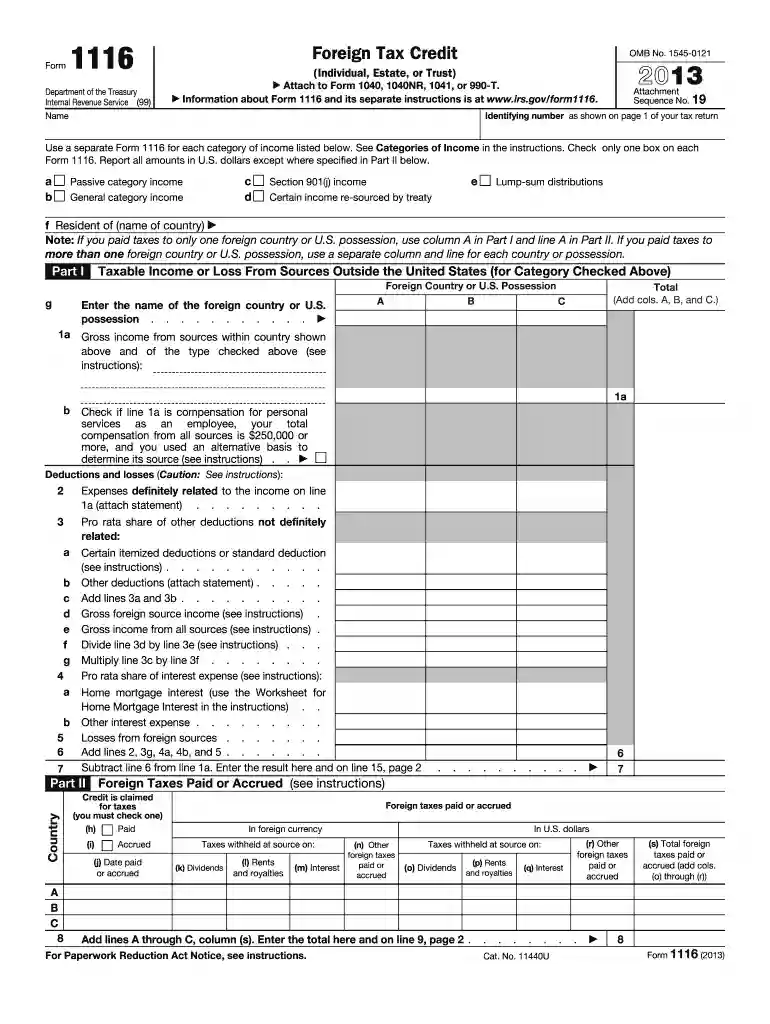
Begin by entering your identifying number and name at the top of the form. This information is crucial for linking your form to your tax return.
Select the category of income you are reporting by checking one box in Part I. Ensure you use a separate Form 1116 for each category.
In Part I, enter your taxable income or loss from foreign sources in the appropriate fields. Be sure to report all amounts in U.S. dollars.
Proceed to Part II to detail any foreign taxes paid or accrued. Fill in the required columns accurately, including dates and amounts.
Finally, complete Part III by calculating your foreign tax credit based on the information provided in previous sections. Follow the instructions carefully for accurate results.
Start using our platform today for free to simplify filling out Form 1116!
Web schedule b (form 1116) is used to reconcile your prior year foreign tax carryover with your current year foreign tax carryover. If the taxpayer has aRead more
Sep 16, 2025 Use a separate Form 1116 for each category of income listed below. See Categories of Income in the instructions. Check only one box on each.Read more
Cookie consent notice
This site uses cookies to enhance site navigation and personalize your experience.
By using this site you agree to our use of cookies as described in our Privacy Notice.
You can modify your selections by visiting our Cookie and Advertising Notice.