Type text, add images, blackout confidential details, add comments, highlights and more.
02. Sign it in a few clicks
Draw your signature, type it, upload its image, or use your mobile device as a signature pad.
03. Share your form with others
Send danielson lesson plan template via email, link, or fax. You can also download it, export it or print it out.
How to use or fill out model lesson template with our platform
Ease of Setup
DocHub User Ratings on G2
Ease of Use
DocHub User Ratings on G2
Click ‘Get Form’ to open the model lesson template in the editor.
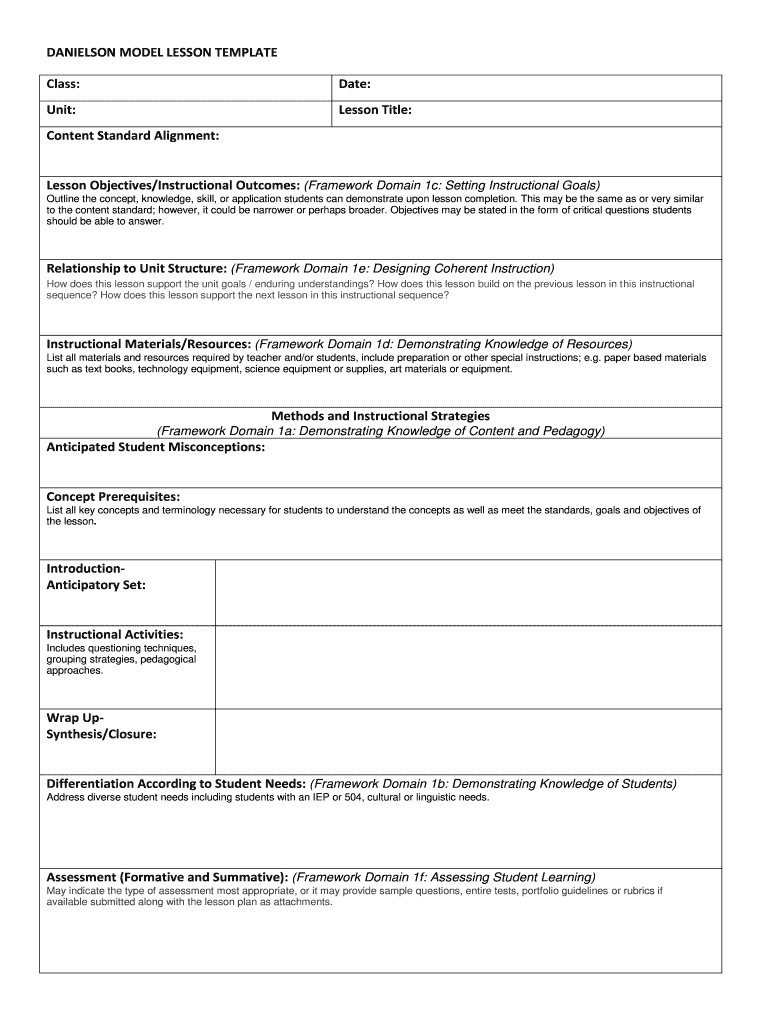
Begin by filling in the 'Class', 'Date', and 'Unit' fields at the top of the template. These details set the context for your lesson.
In the 'Lesson Title' section, provide a clear and concise title that reflects the focus of your lesson.
For 'Content Standard Alignment', specify how your lesson aligns with educational standards, ensuring clarity on its relevance.
Outline your 'Lesson Objectives/Instructional Outcomes'. Clearly state what students should achieve by the end of the lesson, using critical questions if possible.
Detail how this lesson relates to previous and future lessons under 'Relationship to Unit Structure'. This helps maintain coherence in instruction.
List all necessary materials and resources in the 'Instructional Materials/Resources' section, including any special preparation needed.
Describe your teaching methods and strategies in the corresponding section, focusing on how you will engage students effectively.
Anticipate potential student misconceptions and list key concepts required for understanding under 'Concept Prerequisites'.
Complete sections on instructional activities, wrap-up strategies, differentiation needs, and assessment methods as applicable.
Start using our platform today to effortlessly create engaging lesson plans for free!
Model lesson template wordModel lesson template pdfLesson plan template free downloadModel lesson template freeLesson plan template WordLesson plan Template Word free downloadModel lesson template powerpointLesson Plan Template PDF
Security and compliance
At DocHub, your data security is our priority. We follow HIPAA, SOC2, GDPR, and other standards, so you can work on your documents with confidence.
Lesson Plan Template. Class Date: Back ground Information: Course Name/Description: Institution: Lesson Length: Description of Students: Le vel: Number ofRead more
Add a stage column to your lessons log while not part of the official PRINCE2 template, it helps identify when (e.g., next stage) a lesson is most relevant.Read more
Outline the concept, knowledge, skill, or application students can demonstrate upon lesson completion. This may be the same as or very similar to the contentRead more
Cookie consent notice
This site uses cookies to enhance site navigation and personalize your experience.
By using this site you agree to our use of cookies as described in our Privacy Notice.
You can modify your selections by visiting our Cookie and Advertising Notice.