Type text, add images, blackout confidential details, add comments, highlights and more.
02. Sign it in a few clicks
Draw your signature, type it, upload its image, or use your mobile device as a signature pad.
03. Share your form with others
Send form n61 via email, link, or fax. You can also download it, export it or print it out.
How to use or fill out n56 form with our platform
Ease of Setup
DocHub User Ratings on G2
Ease of Use
DocHub User Ratings on G2
Click ‘Get Form’ to open the n56 form in the editor.
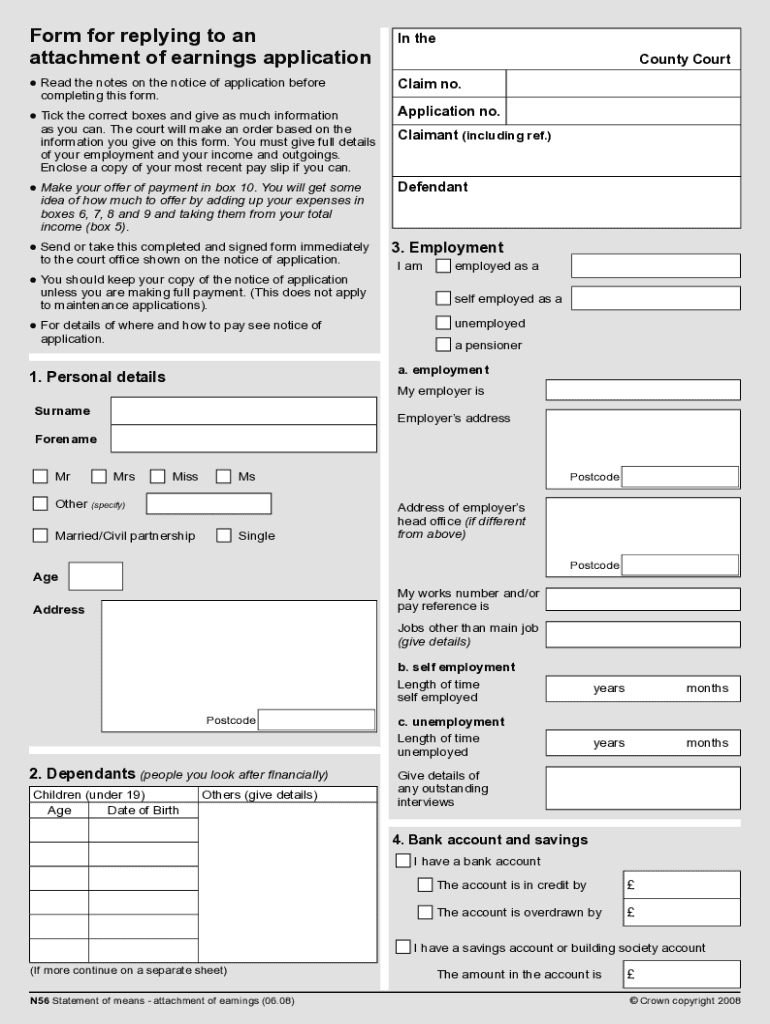
Begin by filling out your personal details in section 1. Include your name, address, and marital status. Ensure accuracy as this information is crucial for processing.
In section 3, indicate your employment status. Select whether you are employed, self-employed, unemployed, or a pensioner. Provide details about your employer if applicable.
Complete section 5 regarding your income. List all sources of income and their amounts per week or month to give a clear picture of your financial situation.
Move to section 6 to detail your regular expenses. This includes rent, mortgage, utilities, and any other recurring payments that impact your finances.
In section 10, make an offer of payment based on the information provided in previous sections. Calculate this by considering your total income against expenses.
Finally, review all entries for accuracy before signing the declaration in section 11 and submitting the form to the court office as instructed.
Start using our platform today for free to streamline your n56 form completion!
Registration of N30-N56, N741, N743, N745, N747, U362
by KP Vogel 2005 Cited by 4 Both forms may be present in these lines. Gengenbach, B.G., H.J. Gorz, and F.A. Haskins. 1970. Genetic studies. Lines N46 through N49, and N741Read more
N56 bound to AuNP forms a complex with CEA. 6. It flows along the pad, passing through the test line and control line. 7. The N56-CEA complex binds only toRead more
Cookie consent notice
This site uses cookies to enhance site navigation and personalize your experience.
By using this site you agree to our use of cookies as described in our Privacy Notice.
You can modify your selections by visiting our Cookie and Advertising Notice.