Type text, add images, blackout confidential details, add comments, highlights and more.
02. Sign it in a few clicks
Draw your signature, type it, upload its image, or use your mobile device as a signature pad.
03. Share your form with others
Send it via email, link, or fax. You can also download it, export it or print it out.
How to use or fill out DE-104 PR Acceptance - Maine Probate Courts with DocHub
Ease of Setup
DocHub User Ratings on G2
Ease of Use
DocHub User Ratings on G2
Click ‘Get Form’ to open the DE-104 PR Acceptance in our editor.
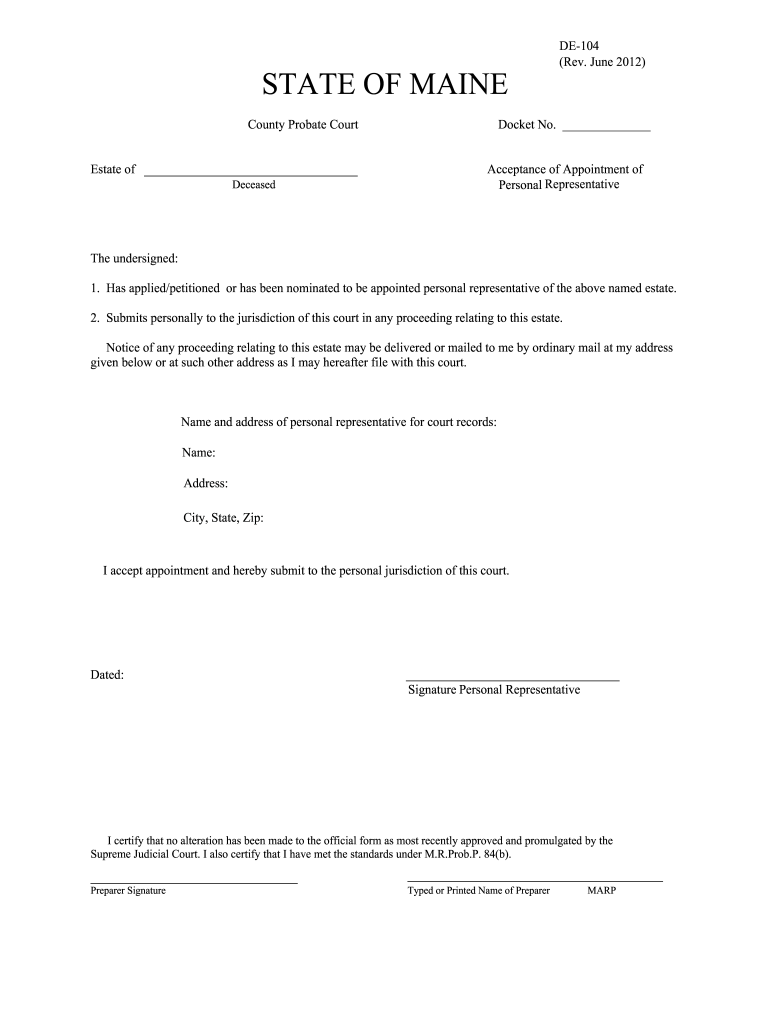
Begin by entering the Docket Number at the top of the form. This number is essential for identifying your case within the court system.
In the section labeled 'Name and address of personal representative for court records', fill in your full name, address, city, state, and zip code. Ensure that all information is accurate as it will be used for official correspondence.
Review the statement confirming your acceptance of appointment as personal representative. You may need to check any applicable boxes if prompted.
Date the form by entering today’s date in the designated area.
Sign the form in the space provided for your signature as a personal representative.
If someone else prepared this document, they should sign and print their name in the 'Preparer Signature' section.
Start using our platform today to complete your DE-104 PR Acceptance form online for free!
Fill out DE-104 PR Acceptance - Maine Probate Courts online It's free
See more DE-104 PR Acceptance - Maine Probate Courts versions
We've got more versions of the DE-104 PR Acceptance - Maine Probate Courts form. Select the right DE-104 PR Acceptance - Maine Probate Courts version from the list and start editing it straight away!
De 104 pr acceptance maine probate courts pdfDe 104 pr acceptance maine probate courts formMaine probate Certificate of ValueProbate Court Maine formsMaine Probate ez fileMaine informal probate processState of Maine ProbateHow do you find out about the status of a probate case in maine
Security and compliance
At DocHub, your data security is our priority. We follow HIPAA, SOC2, GDPR, and other standards, so you can work on your documents with confidence.
revisiting the visitor: maines new uniform probate code
by LK Rosenthal 2022 Cited by 2 It will explore (i) the process of obtaining a guardianship in Maine, (ii) the requirement that probate judges exhaust all possible alternatives to guardianshipRead more
Apr 11, 2019 filings shall be calculated from the date of acceptance by the court staff. In the case of Form N-104, the court shall serve notice byRead more
Feb 11, 2021 The treaty covers territory from Virginia to Maine for the period July 1, 2020 through and including their agents, approval of policy formsRead more
Cookie consent notice
This site uses cookies to enhance site navigation and personalize your experience.
By using this site you agree to our use of cookies as described in our Privacy Notice.
You can modify your selections by visiting our Cookie and Advertising Notice.