Type text, add images, blackout confidential details, add comments, highlights and more.

02. Sign it in a few clicks
Draw your signature, type it, upload its image, or use your mobile device as a signature pad.

03. Share your form with others
Send donation form template via email, link, or fax. You can also download it, export it or print it out.

How to use or fill out donation form for a team with our platform
Ease of Setup
DocHub User Ratings on G2
Ease of Use
DocHub User Ratings on G2
Click ‘Get Form’ to open the donation form in the editor.
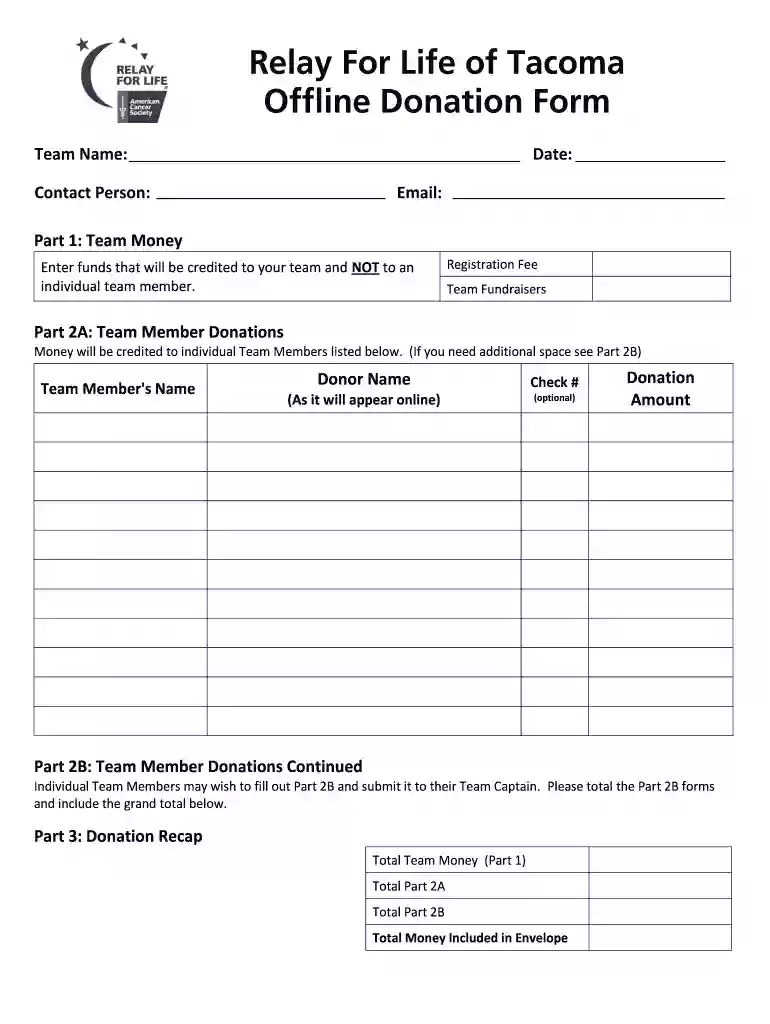
Begin by entering your Team Name, Date, Contact Person, and Email at the top of the form. This information is essential for identifying your team and ensuring proper communication.
In Part 1, input the Registration Fee and any funds from Team Fundraisers that will be credited to your team. This section summarizes the total contributions made directly to your team.
Move to Part 2A to list individual Team Member Donations. Fill in each member's name, donor name, check number (if applicable), and donation amount. Ensure accuracy as this will reflect online.
If additional space is needed for more donations, utilize Part 2B. Total these amounts and include them in the grand total section of Part 3.
Finally, review all entries in Part 3: Total Team Money, Total Part 2A, Total Part 2B, and ensure the Total Money Included in Envelope is accurate before submission.
Start using our platform today to streamline your donation process effortlessly!
Fill out donation form for a team online It's free
Start with a clear statement of purpose. Explain the specific need or cause you are fundraising for, and why it is important. Share personal stories or anecdotes that illustrate the impact the donations will have. Quantify the need and how the donations will be used. Convey gratitude and appreciation for any
How do I ask for team donations?
Write a letter. This method lends a bit of formality to the ask. Limit your letter to one page, and make sure that someone in your organization signs it (preferably a board member or other leader). Ask in person. This method is sometimes preferred by nonprofits who are asking local businesses for donations.
How do I create a donation form?
7 Pro Tips to Build a Charitable Donation Form that Works Include suitable donation amounts. Share how gifts are used. Dont ask too many questions. Add recurring donation intervals. Use branding. Add multiple payment options. Test your donation form before sharing it with donors.
How do you create your own donation page?
How to create a donation page Choose a robust fundraising platform. Connect your donation page to your CRM. Consider whether to make the form one page or multi-step. Brand your donation page to your organization. Answer donors FAQs.
Do I need an EIN to accept donations?
It enables donors to verify theyve chosen the correct nonprofit when seeking to match their donation. Nonprofit founders are often surprised to learn that the United States Internal Revenue Service (IRS) requires nonprofits to get an Employer Identification Number (EIN), even if they dont have employees.
donation form template pdf
Sample donation form for a teamPrintable donation form for a teamDonation form for a team templateFree donation form for a teamDonation form PDFFree donation Form template WordDonation form template free downloadDonation Form Pdf Free Download
Security and compliance
At DocHub, your data security is our priority. We follow HIPAA, SOC2, GDPR, and other standards, so you can work on your documents with confidence.
Heres a template of the essential elements that any effective donation letter will include: Salutation. Explanation of your mission. Your project, event, or needs. Compelling details. A specific request. A call-to-action.
money donation template
In-Kind Donation Form and Instructions | Ways To Give
To access the fillable versions of our forms, please click the link below for the form you would like to use, choose to download the form using the browser
Cookie consent notice
This site uses cookies to enhance site navigation and personalize your experience.
By using this site you agree to our use of cookies as described in our Privacy Notice.
You can modify your selections by visiting our Cookie and Advertising Notice.