Florida rmp 2026

Get Form
rmp Preview on Page 1

Here's how it works

01. Edit your rmp online
Type text, add images, blackout confidential details, add comments, highlights and more.

02. Sign it in a few clicks
Draw your signature, type it, upload its image, or use your mobile device as a signature pad.

03. Share your form with others
Send it via email, link, or fax. You can also download it, export it or print it out.

How to use or fill out Florida RMP with our platform

Form edit decoration
9.5
Ease of Setup
DocHub User Ratings on G2
9.0
Ease of Use
DocHub User Ratings on G2
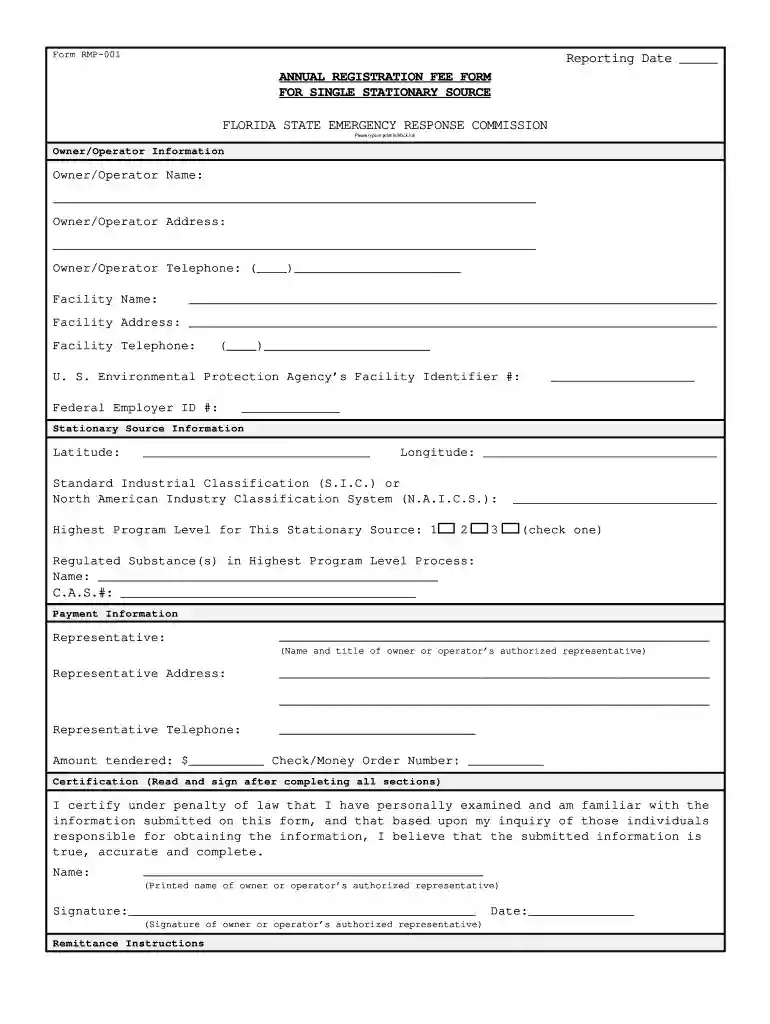
  1. Click ‘Get Form’ to open the Florida RMP in the editor.
  2. Begin by entering the Reporting Date at the top of the form. Ensure this is accurate as it reflects your submission timeline.
  3. Fill in the Owner/Operator Information section. Provide your name, address, and telephone number clearly. This information is crucial for identification.
  4. Next, complete the Facility Name and Address fields. Make sure these details match your official records for consistency.
  5. In the Stationary Source Information section, input the Latitude and Longitude of your facility. This data helps in geographical identification.
  6. Select the Standard Industrial Classification (S.I.C.) or North American Industry Classification System (N.A.I.C.S.) relevant to your operations.
  7. Indicate the Highest Program Level for your stationary source by checking one of the options provided.
  8. List any Regulated Substance(s) involved in your highest program level process along with their C.A.S. numbers.
  9. Complete the Payment Information section, including details about your authorized representative and payment amount.
  10. Finally, read and sign the Certification section to affirm that all information is true and complete before submitting.

Start filling out your Florida RMP today using our platform for free!

be ready to get more

Complete this form in 5 minutes or less

Get form

Got questions?

We have answers to the most popular questions from our customers. If you can't find an answer to your question, please contact us.
Contact us
The RMP rule requires facilities that use extremely hazardous substances to develop a Risk Management Plan which: identifies the potential effects of a chemical accident, identifies steps the facility is taking to prevent an accident, and. spells out emergency response procedures should an accident occur.
What is an RMP? In healthcare industry, a risk management plan (RMP) refers to a document submitted by pharmaceutical companies to the Ministry of Health, Labour and Welfare. It consolidates the risk management process for a pharmaceutical product, covering all stages from development to post-marketing.
The Motor Carrier Safety Unit utilizes Chevrolet Tahoes and Traverses. They are not termed as Police car cruisers but rather as Radio Motor Patrol units(RMPs).
The Royal Military Police (RMP) is the British Army corps in charge of policing army service troops and providing a military police presence entry would require an extensive history of actively serving the military for selection.
Risk Management Program (RMP) Rule | US EPA.

Security and compliance

At DocHub, your data security is our priority. We follow HIPAA, SOC2, GDPR, and other standards, so you can work on your documents with confidence.

Learn more
ccpa2
pci-dss
gdpr-compliance
hipaa
soc-compliance

People also ask

The California Refrigerant Management Program (RMP) affects technicians and contractors who service refrigeration and air conditioning equipment using those high-GWP gases. Californias required service practices for these refrigerants include having a current, valid U.S. EPA certificate, no venting, and using proper
The RMP applies to stationary sources of pollution from which an accidental release of a hazardous chemical may occur. EPA can enforce compliance with the RMP rule through administrative, civil, and criminal enforcement.
Summary of risk management plan (RMP) RMP aims for the risks of drugs to be evaluated at regular intervals or in response to the progress of post-marketing surveillance and pharmacovigilance activities to minimize the risks of drugs.

Related links