Form 1198-2026

Get Form
t1198 form Preview on Page 1

Here's how it works

01. Edit your t1198 form online
Type text, add images, blackout confidential details, add comments, highlights and more.

02. Sign it in a few clicks
Draw your signature, type it, upload its image, or use your mobile device as a signature pad.

03. Share your form with others
Send 1198 form via email, link, or fax. You can also download it, export it or print it out.

How to use or fill out form 1198 with our platform

Form edit decoration
9.5
Ease of Setup
DocHub User Ratings on G2
9.0
Ease of Use
DocHub User Ratings on G2
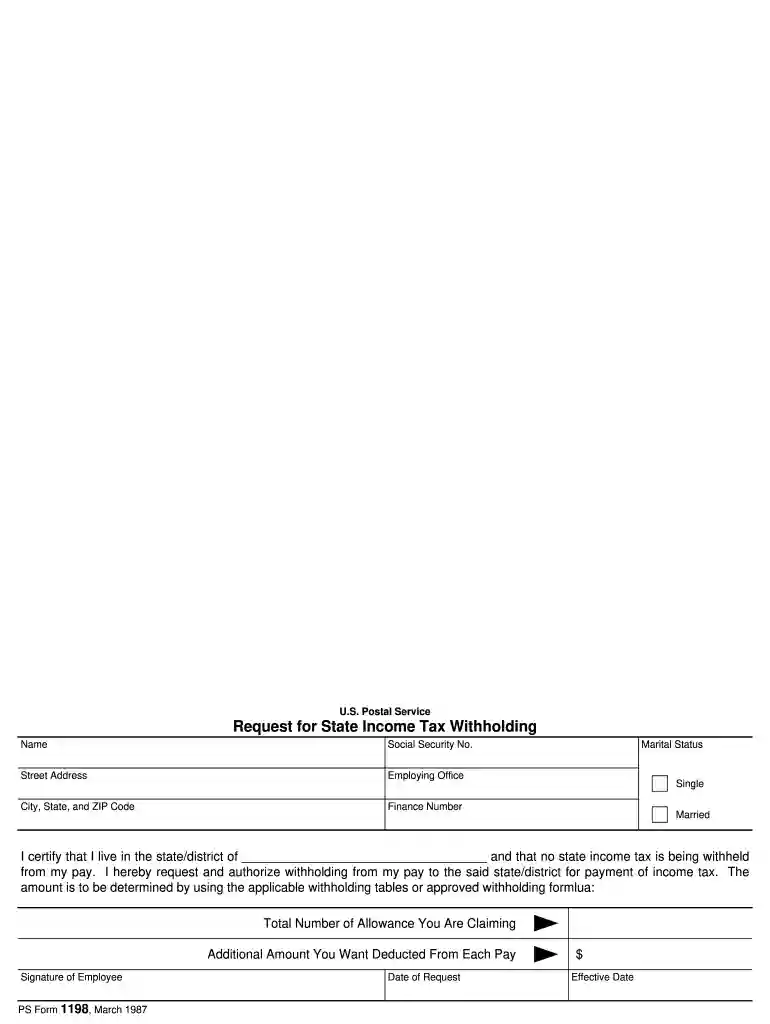
  1. Click ‘Get Form’ to open form 1198 in the editor.
  2. Begin by entering your name and Social Security Number in the designated fields at the top of the form.
  3. Fill in your street address, city, state, and ZIP code to ensure accurate identification.
  4. Indicate your marital status by selecting either 'Single' or 'Married'.
  5. In the certification section, specify the state or district where you reside and confirm that no state income tax is currently withheld from your pay.
  6. Enter the total number of allowances you are claiming and any additional amount you wish to be deducted from each pay period.
  7. Sign and date the form to validate your request for withholding adjustments.

Start using our platform today for free to complete your form 1198 effortlessly!

be ready to get more

Complete this form in 5 minutes or less

Get form

Got questions?

We have answers to the most popular questions from our customers. If you can't find an answer to your question, please contact us.
Contact us
1098 forms are used to report tax-deductible expenses such as mortgage interest (1098), student loan interest (1098-E), tuition payments(1098-T), and donations of motor vehicles (1098-C).
Form T1198 helps you (and the CRA) calculate whether you qualify for a reduced tax rate on retroactive payments. The CRA recognizes that lump-sum amounts for prior years could otherwise place you into a higher tax bracket in the year you receive them.
The income received on form T1198 - Qualifying retroactive lump sum payment must be included on slips T4, T4A or T4E of the beneficiary and included in the tax return.
A Statement of Qualifying Retroactive Lump-Sum Payment (or T1198) is created by payers (the Algonquin and Lakeshore Catholic District School Board) to recipients (eligible employees) who received a qualifying retroactive lump-sum payment or payments.
The payer has to fill out Form T1198 or provide the following information in writing to the employee: the year in which the lump-sum payment was made to the employee. a complete description of the lump-sum payment and the circumstances that required it to be paid.

Security and compliance

At DocHub, your data security is our priority. We follow HIPAA, SOC2, GDPR, and other standards, so you can work on your documents with confidence.

Learn more
ccpa2
pci-dss
gdpr-compliance
hipaa
soc-compliance

People also ask

How Do I Complete Form T1198? The organization or person who paid you the lump-sum payment must complete Form T1198 for you. The form requires them to break down how much of the lump-sum relates to each year. They will also need to include your personal information, including your Social Insurance Number (SIN).
The 1198 form is a document used for reporting certain financial information to the relevant tax authorities, typically used in the context of tax filings.

t1198