Adhs incident report 2026

Get Form
adhs incident report Preview on Page 1

Here's how it works

01. Edit your form online
Type text, add images, blackout confidential details, add comments, highlights and more.
02. Sign it in a few clicks
Draw your signature, type it, upload its image, or use your mobile device as a signature pad.
03. Share your form with others
Send it via email, link, or fax. You can also download it, export it or print it out.

How to use or fill out adhs incident report with our platform

Form edit decoration
9.5
Ease of Setup
DocHub User Ratings on G2
9.0
Ease of Use
DocHub User Ratings on G2
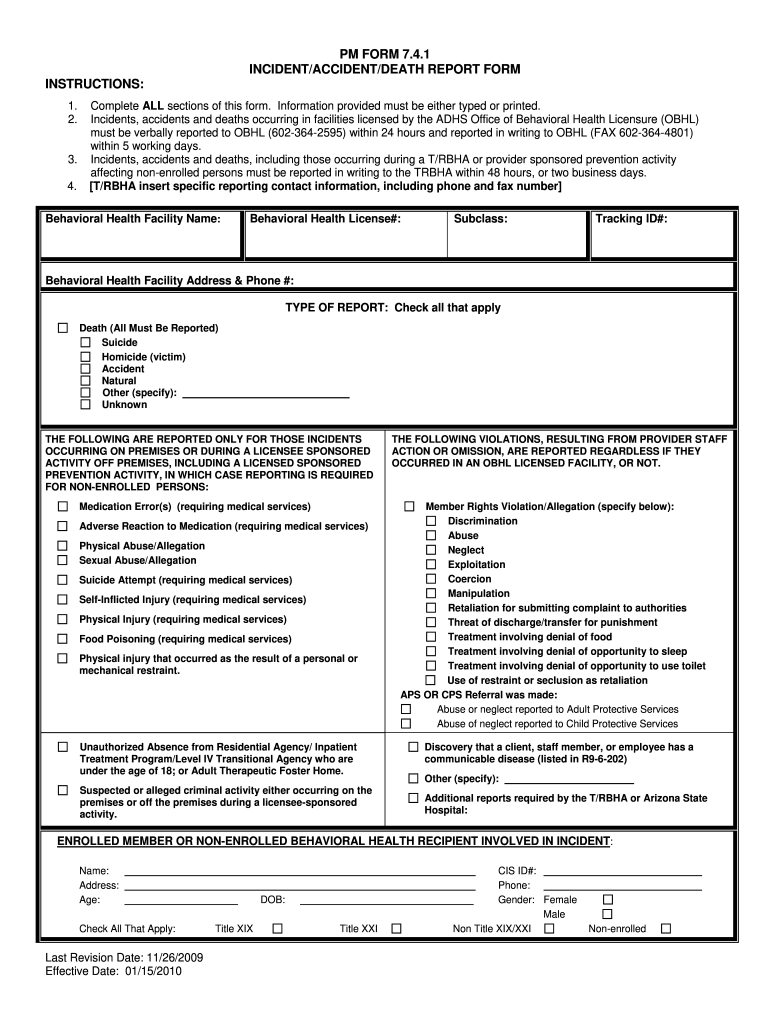
  1. Click ‘Get Form’ to open the adhs incident report in the editor.
  2. Begin by filling in the 'Behavioral Health Facility Name' and 'License#'. Ensure all information is accurate and clearly typed.
  3. In the 'TYPE OF REPORT' section, check all applicable boxes such as Death, Accident, or other specified incidents. This helps categorize the report correctly.
  4. Provide detailed information about the enrolled or non-enrolled behavioral health recipient involved in the incident, including their name, address, age, and diagnosis.
  5. Document the 'INCIDENT DETAILS', including date, time, location, and a description of what occurred. Be thorough to ensure clarity.
  6. Complete sections regarding individuals who observed the incident and describe their relationship to the person involved.
  7. Finally, ensure that all required signatures are obtained in the 'CLINICAL DIRECTOR’S OR DESIGNEE’S REVIEW OF INCIDENT' section before submitting.

Start using our platform today for free to streamline your document editing and reporting process!

See more adhs incident report versions

We've got more versions of the adhs incident report form. Select the right adhs incident report version from the list and start editing it straight away!
Versions Form popularity Fillable & printable
2012 4.8 Satisfied (160 Votes)
2009 4.4 Satisfied (104 Votes)
be ready to get more

Complete this form in 5 minutes or less

Get form

Got questions?

We have answers to the most popular questions from our customers. If you can't find an answer to your question, please contact us.
Contact us
Arizona Department of Health Services.
incidents that result in a worker fatality, or result or may result in a worker being admitted to hospital. an unplanned or uncontrolled explosion, fire or flood that causes a serious injury or illness or has the potential to cause a serious injury or illness. a crane, derrick or hoist collapse or upset.
Steps to Follow When Reporting and Recording An Accident Step 1: Find Your Appointed Competent Person. Step 2: Log the Accident in the Accident Book. Stage 3: Carry Out a Formal Investigation. Stage 4: Identify Whether the Accident is Reportable. Stage 5: Filling in the Forms. Stage 6: Review Your Risk Assessments.
Here are the main types of incident reports: Security Incident: This involves bdocHubes of physical or information security. Injury and Lost Time Incident Report: This involves documenting instances where employees are injured on the job, leading to time away from work. Exposure Incident Report: Sentinel Event Report:
What are the five rules of incident report writing? Timeliness: Always report the incident as soon as possible. Accuracy: Make sure all information provided is accurate and detailed. Completeness: Be thorough and provide all important details. Confidentiality: Handle sensitive and personal information carefully.

Security and compliance

At DocHub, your data security is our priority. We follow HIPAA, SOC2, GDPR, and other standards, so you can work on your documents with confidence.

Learn more
ccpa2
pci-dss
gdpr-compliance
hipaa
soc-compliance
be ready to get more

Complete this form in 5 minutes or less

Get form