Initial Return/Notice of Change by an Ontario Corporation Form 1 - forms ssb gov on 2026

Get Form
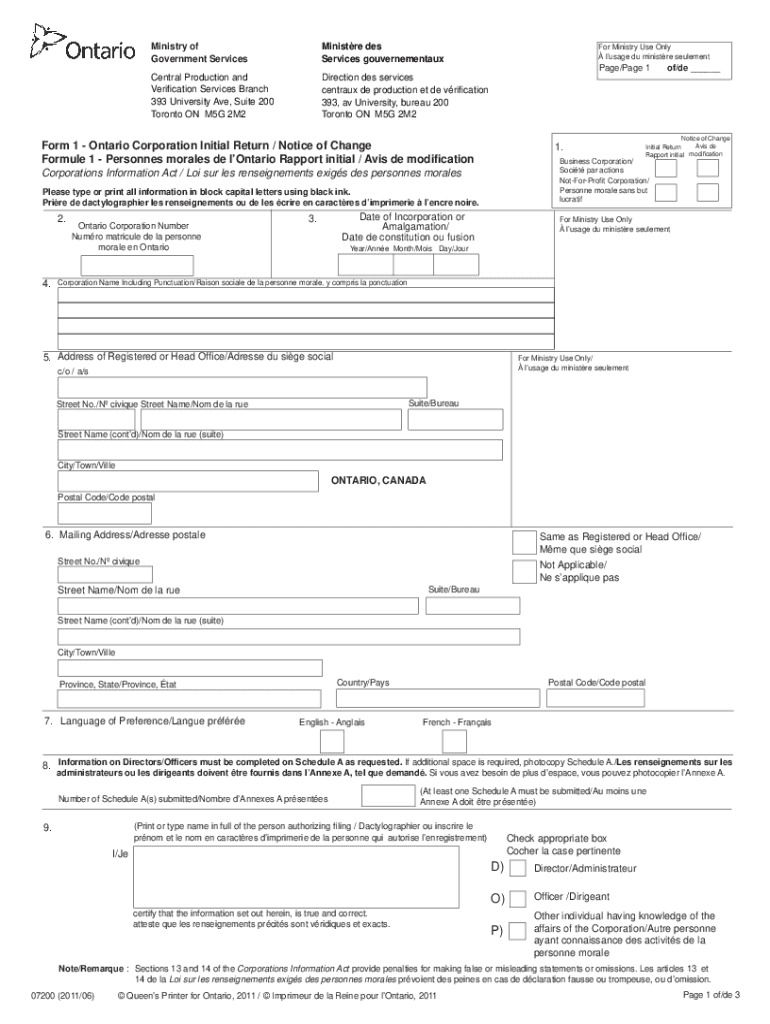
form 1 initial return notice of change download Preview on Page 1

Here's how it works

01. Edit your form 1 initial return notice of change download online
Type text, add images, blackout confidential details, add comments, highlights and more.
02. Sign it in a few clicks
Draw your signature, type it, upload its image, or use your mobile device as a signature pad.
03. Share your form with others
Send notice of change ontario corporation via email, link, or fax. You can also download it, export it or print it out.

How to use or fill out Initial Return/Notice of Change by an Ontario Corporation Form 1 - forms ssb gov on with DocHub

Form edit decoration
9.5
Ease of Setup
DocHub User Ratings on G2
9.0
Ease of Use
DocHub User Ratings on G2
  1. Click ‘Get Form’ to open it in the editor.
  2. In Item 1, indicate whether you are filing an Initial Return or a Notice of Change by placing an X in the appropriate box.
  3. For Item 2, enter your Ontario Corporation Number, which can be found on your Certificate of Incorporation.
  4. In Item 3, provide the full date of incorporation or amalgamation using the numeric format: Year, Month, Day.
  5. Complete Item 4 with the corporation's name, ensuring all punctuation and spacing is accurate.
  6. Fill out Item 5 with the complete address of your Registered or Head Office in Ontario; avoid using post office box numbers.
  7. In Item 6, specify your Mailing Address. If it’s the same as your registered office, check the corresponding box.
  8. Select your preferred language for correspondence in Item 7.
  9. Indicate how many Schedule A(s) you are submitting in Item 8 and ensure they are completed fully.
  10. Finally, print and sign your name in Item 9 to authorize the filing. Ensure you select whether you are a director or officer.

Start filling out your form today for free using our platform!

See more Initial Return/Notice of Change by an Ontario Corporation Form 1 - forms ssb gov on versions

We've got more versions of the Initial Return/Notice of Change by an Ontario Corporation Form 1 - forms ssb gov on form. Select the right Initial Return/Notice of Change by an Ontario Corporation Form 1 - forms ssb gov on version from the list and start editing it straight away!
Versions Form popularity Fillable & printable
2011 4.5 Satisfied (60 Votes)
be ready to get more

Complete this form in 5 minutes or less

Get form

Got questions?

We have answers to the most popular questions from our customers. If you can't find an answer to your question, please contact us.
Contact us
Initial Returns Service If you have incorporated in Ontario you are required to file a Form 1, Initial Return, within the first 60 days. Corporations must complete and submit an Initial Return to the Ontario Ministry within 60 days after the date of incorporation.
Ontario Amendment (Name change) IncorpDirect Fee$225.00 Government Fee (tax exempt) $150.00 Company Name Choose an option NUANS Name Search ($39.95) Upload My Own (Free) Minute book resolution for name amendment $49.95 Shipping Choose an option Electronic Delivery ($14.95)1 more row
Initial Return vs. They are filed to notify the government that the information provided during the incorporation process is accurate and up-to-date. The Initial Return is filed once while an Annual return needs to be filed every year. Every business corporation in Canada must file an annual return every year.
Ontario Annual Return An Annual Return for an Ontario Corporation is additional to Filing a Corporate Tax Return with the Canada Revenue Agency. An Annual Return must be filed within 6 months after the Corporations Fiscal Year End, even if the business has not generated any income during the year.
All Ontario corporations, including business, not-for-profit, co-operative and other Ontario corporations must file an Initial Return under the CIA setting out the required information within 60 days after the date of incorporation, amalgamation or continuation into Ontario of the corporation (s.

Security and compliance

At DocHub, your data security is our priority. We follow HIPAA, SOC2, GDPR, and other standards, so you can work on your documents with confidence.

Learn more
ccpa2
pci-dss
gdpr-compliance
hipaa
soc-compliance
be ready to get more

Complete this form in 5 minutes or less

Get form