





Pension direct deposit form 2026

Get Form
mycentralstatespension Preview on Page 1

Here's how it works

01. Edit your mycentralstatespension online
Type text, add images, blackout confidential details, add comments, highlights and more.
02. Sign it in a few clicks
Draw your signature, type it, upload its image, or use your mobile device as a signature pad.
03. Share your form with others
Send centralstatespension via email, link, or fax. You can also download it, export it or print it out.

How to use or fill out pension direct deposit form with our platform

Form edit decoration
9.5
Ease of Setup
DocHub User Ratings on G2
9.0
Ease of Use
DocHub User Ratings on G2
  1. Click ‘Get Form’ to open the pension direct deposit form in the editor.
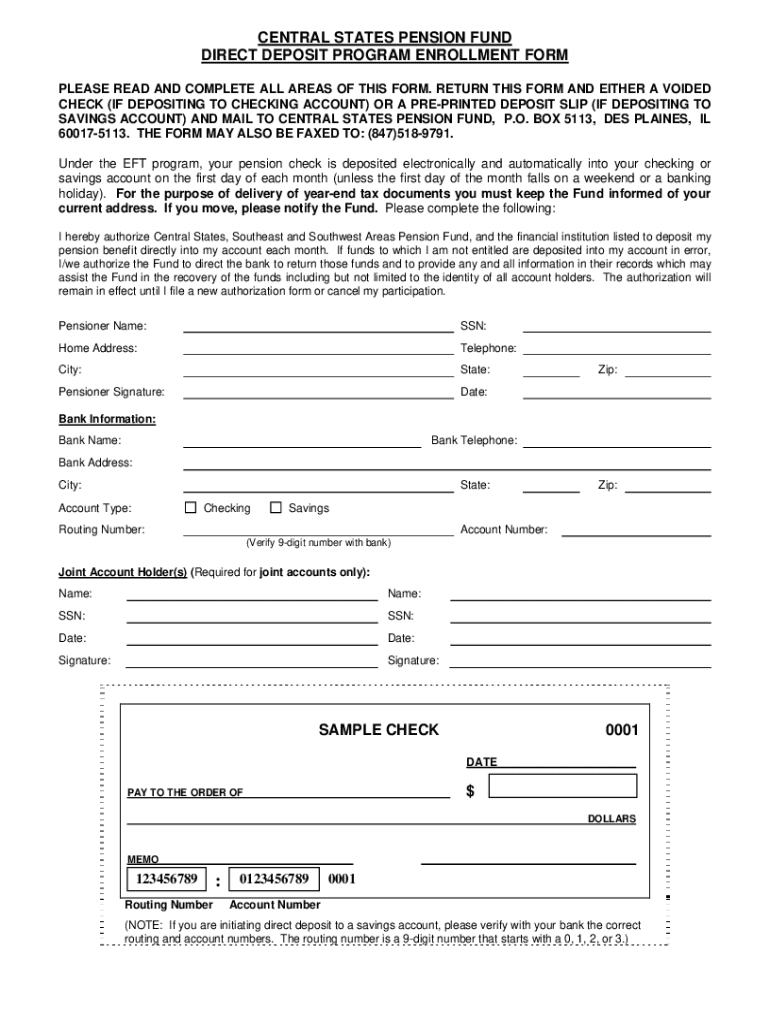
  2. Begin by entering your personal information, including your name, Social Security Number (SSN), home address, and telephone number. Ensure all details are accurate for smooth processing.
  3. In the Bank Information section, provide the bank's name, telephone number, and address. Select your account type (Checking or Savings) and input the routing number and account number. Verify these numbers with your bank to avoid errors.
  4. If applicable, include information for any joint account holders by filling in their names and SSNs. Both parties must sign where indicated.
  5. Review all entered information for accuracy. Once confirmed, download or print the completed form along with a voided check or pre-printed deposit slip.
  6. Return the completed form and supporting documents via mail or fax as instructed on the form.

Start using our platform today to easily complete your pension direct deposit form online for free!

See more pension direct deposit form versions

We've got more versions of the pension direct deposit form form. Select the right pension direct deposit form version from the list and start editing it straight away!
Versions Form popularity Fillable & printable
2013 4.8 Satisfied (62 Votes)
be ready to get more

Complete this form in 5 minutes or less

Get form

Got questions?

We have answers to the most popular questions from our customers. If you can't find an answer to your question, please contact us.
Contact us

Electronic signatures are an excellent replacement for traditional signing, as they save time, effort, and costs people spend on printing, scanning, and paper delivery. You can eSign your direct deposit form utilizing a reliable and powerful online document management tool like DocHub. It complies with main eSignature policies (ESIGN and UETA), so all documents approved there are legally binding and have the same validity as manually signed ones.

You can find and edit your mycentralstatespension org online by using DocHub. Its simple but feature-rich design enables you to begin productive work right after you register your account. Create your profile and add your document, then our user interface will guide you via our stress-free form completion experience.

With direct deposit, your pension payment is deposited directly into your bank accountits fast, convenient and secure. Youll avoid mailing delays, trips to the bank in bad weather and standing in line to cash a check. And you wont need to worry about your check being lost or stolen.
How to start your own pension Step 1: Check if you can join a workplace pension. Step 2: Understand how personal pensions work. Step 3: Compare pension providers, charges and products. Step 4: Sign up to a pension scheme. Step 5: Decide how much to pay into your pension. Step 6: Regularly review your pension savings.
How to set up direct deposit step-by-step Choose a direct deposit provider. Complete setup paperwork. Gather employee information. Upload employee data. Sync direct deposit with a payroll schedule. Process payroll.

Security and compliance

At DocHub, your data security is our priority. We follow HIPAA, SOC2, GDPR, and other standards, so you can work on your documents with confidence.

Learn more
ccpa2
pci-dss
gdpr-compliance
hipaa
soc-compliance
be ready to get more

Complete this form in 5 minutes or less

Get form

People also ask

FAQs Log in to your BroncoDirect Student Center. Go to the Student Financials section and select Bank Accounts or Enroll in Direct Deposit. Enter your U.S. bank routing and account number. Select the account type (checking or savings). Confirm your information and submit.
There are two ways to sign up for direct deposit: By mail - Complete and mail the Direct Deposit Authorization (PDF) to CalPERS. Online - Log in to myCalPERS. Go to the Retirement tab and select Payment Options.
Download, print or email the form to your employer.
You may change your direct deposit information by contacting OPM at 1-888-767-6738 or by faxing the direct deposit information to (724) 794-4668. Be sure to include your claim number on the form.
Deposits can be as large or as small as you like. Bear in mind that tax-deferred retirement accounts are subject to yearly contribution limits, however. Note that Direct Deposit purchases into an Individual Retirement Account (IRA) are for current-year contributions only.

pension direct deposit form