




Here's how it works

01. Edit your communication form online
Type text, add images, blackout confidential details, add comments, highlights and more.

02. Sign it in a few clicks
Draw your signature, type it, upload its image, or use your mobile device as a signature pad.

03. Share your form with others
Send communication form template via email, link, or fax. You can also download it, export it or print it out.
How to use or fill out care home communication form with our platform

- Click ‘Get Form’ to open the care home communication form in the editor.
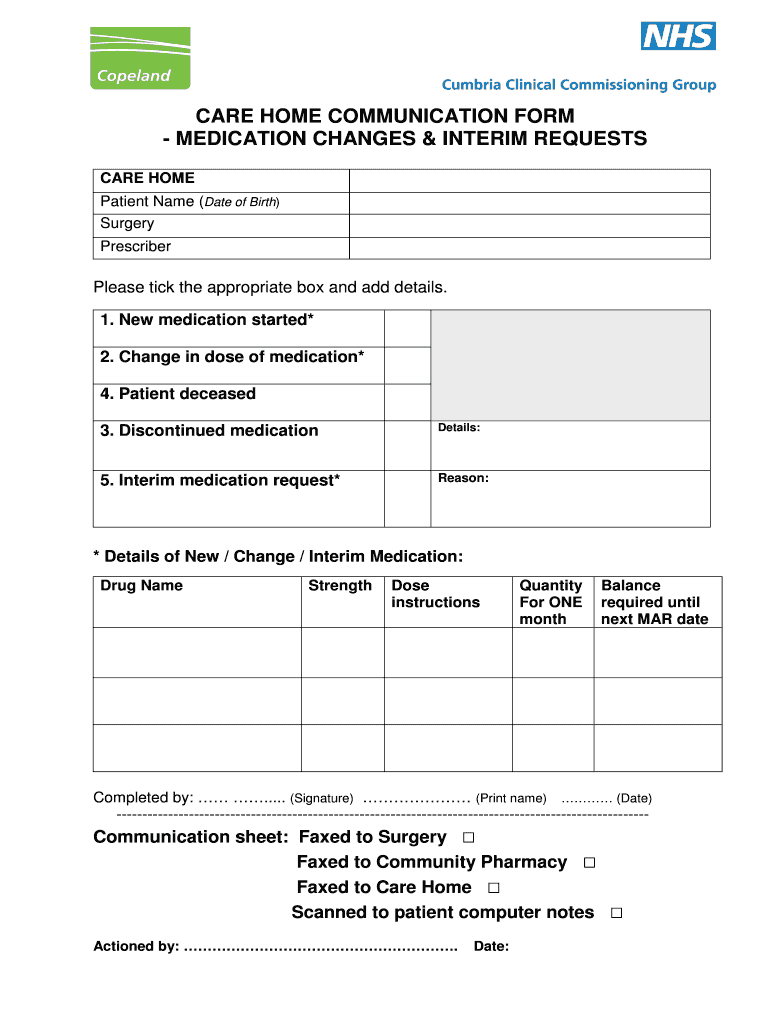
- Begin by entering the patient’s name and date of birth at the top of the form. This information is crucial for accurate record-keeping.
- Next, specify the surgery and prescriber details. This ensures that all relevant parties are informed about medication changes.
- In the section for medication changes, tick the appropriate box for new medications, dose changes, discontinued medications, or if the patient is deceased. Provide additional details as necessary.
- For interim medication requests, clearly state the reason and fill in details such as drug name, strength, dose instructions, quantity needed for one month, and balance required until the next MAR date.
- Complete the form by signing it and printing your name along with the date. Ensure all sections are filled accurately before submission.
- Finally, choose how to distribute this form: fax it to surgery, community pharmacy, or care home; or scan it to patient computer notes as needed.
Start using our platform today to streamline your care home communication process for free!
Fill out care home communication form online
It's free
It's free
Security and compliance
At DocHub, your data security is our priority. We follow HIPAA, SOC2, GDPR, and other standards, so you can work on your documents with confidence.
Learn more




