Type text, add images, blackout confidential details, add comments, highlights and more.
02. Sign it in a few clicks
Draw your signature, type it, upload its image, or use your mobile device as a signature pad.
03. Share your form with others
Send necropsy report example via email, link, or fax. You can also download it, export it or print it out.
How to use or fill out necropsy report with our platform
Ease of Setup
DocHub User Ratings on G2
Ease of Use
DocHub User Ratings on G2
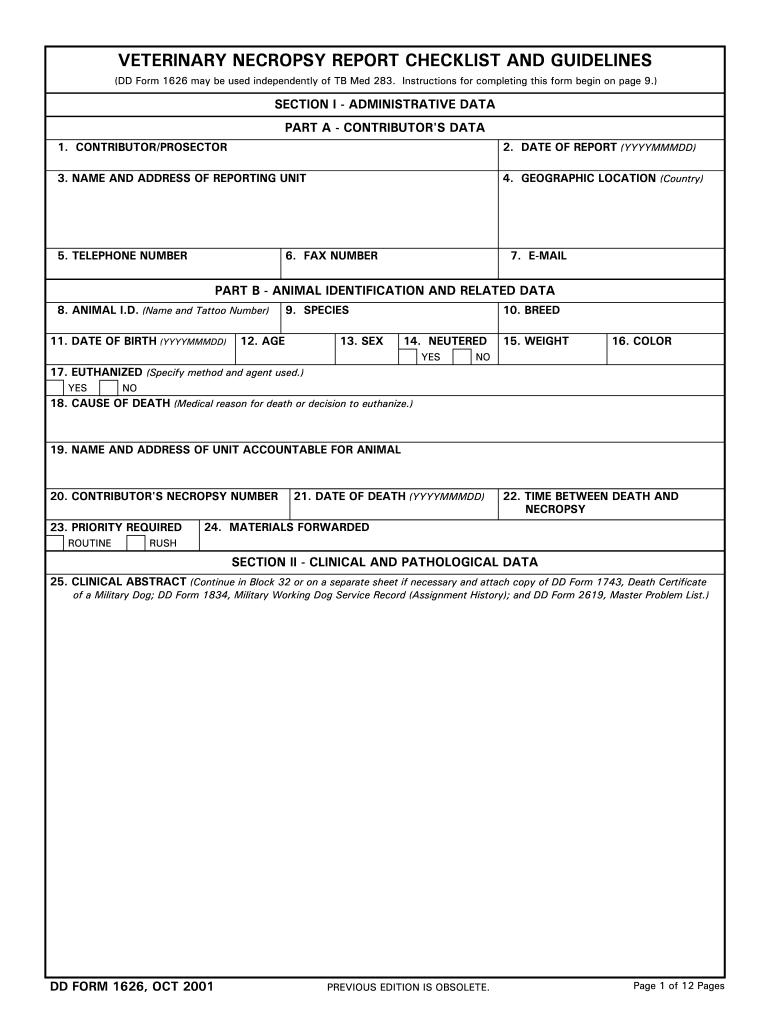
Click ‘Get Form’ to open the necropsy report in the editor.
Begin with SECTION I - ADMINISTRATIVE DATA. Fill in the contributor's data, including your name, date of report, and contact information.
Proceed to PART B - ANIMAL IDENTIFICATION AND RELATED DATA. Enter details such as animal ID, species, age, sex, and weight. Specify if the animal was euthanized and provide the cause of death.
Move on to SECTION II - CLINICAL AND PATHOLOGICAL DATA. Summarize clinical diagnoses and attach any relevant documents as instructed.
In SECTION III - GROSS FINDINGS, document all observations systematically. Use the provided checklist for tissue collection to ensure thoroughness.
Finally, review all sections for accuracy before saving or sharing your completed report directly from our platform.
Start using our platform today for free to streamline your necropsy reporting process!
Our goal is to provide you with gross findings and a preliminary report on the day the necropsy is performed. Final reports may take up to two weeks orRead more
Cookie consent notice
This site uses cookies to enhance site navigation and personalize your experience.
By using this site you agree to our use of cookies as described in our Privacy Notice.
You can modify your selections by visiting our Cookie and Advertising Notice.