Form 723 2026

Get Form
grantor form Preview on Page 1

Here's how it works

01. Edit your grantor form online
Type text, add images, blackout confidential details, add comments, highlights and more.

02. Sign it in a few clicks
Draw your signature, type it, upload its image, or use your mobile device as a signature pad.

03. Share your form with others
Send it via email, link, or fax. You can also download it, export it or print it out.

How to use or fill out form 723

Form edit decoration
9.5
Ease of Setup
DocHub User Ratings on G2
9.0
Ease of Use
DocHub User Ratings on G2
  1. Click ‘Get Form’ to open it in the editor.
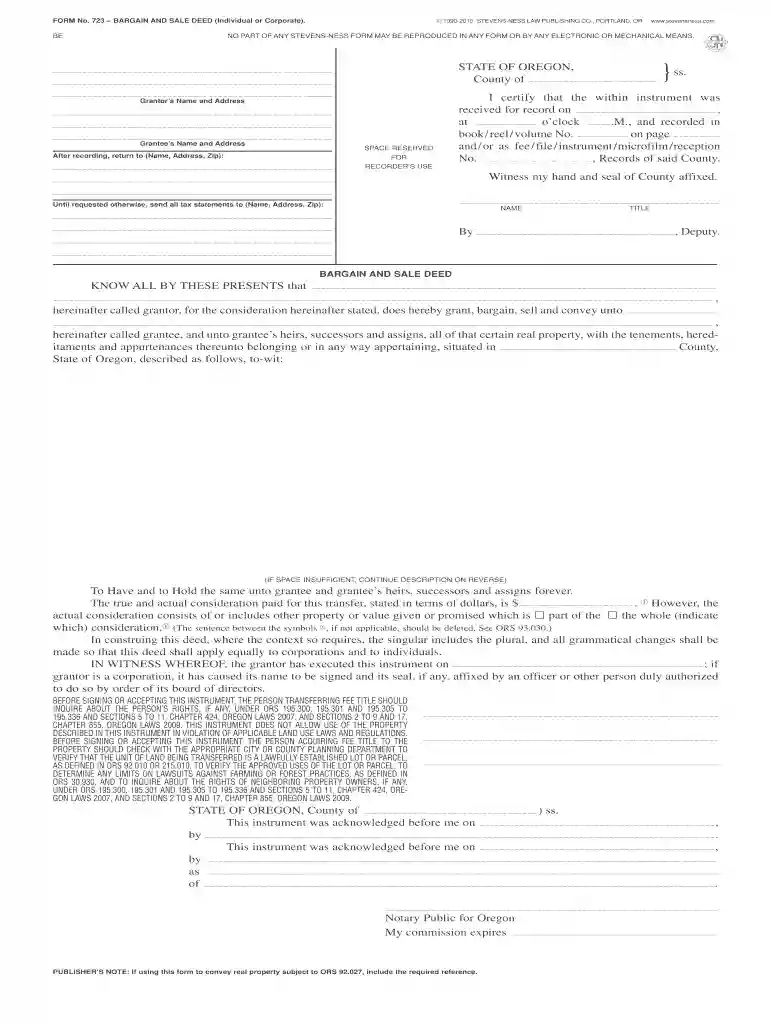
  2. Begin by entering the grantor's name and address in the designated fields. Ensure accuracy as this information is crucial for legal identification.
  3. Next, fill in the grantee's name and address. This identifies who will receive the property rights.
  4. In the property description section, provide a detailed account of the real property being transferred. If more space is needed, continue on a separate page.
  5. Indicate the actual consideration paid for the transfer in dollars. If applicable, specify any additional property or value included in this transaction.
  6. Complete the execution section by signing and dating the document. If representing a corporation, ensure an authorized officer signs on behalf of the entity.

Start using our platform today to easily complete form 723 online for free!

be ready to get more

Complete this form in 5 minutes or less

Get form

Got questions?

We have answers to the most popular questions from our customers. If you can't find an answer to your question, please contact us.
Contact us
Any person required under this title to pay any estimated tax or tax, or required by this title or by regulations made under authority thereof to make a return, keep any records, or supply any information, who willfully fails to pay such estimated tax or tax, make such return, keep such records, or supply such
Attempt to get your Form W-2, Form W-2c, or Form 1099-R (original or corrected) from your employer or payer before contacting the IRS or filing Form 4852. If you dont receive the missing or corrected form from your employer or payer by the end of February, you may call the IRS at 800-829-1040 for assistance.
by TurboTax 154 Updated 8 months ago Form 7203 is used to calculate any limits on the deductions you can take for your share of an S corporations deductions, credits, and other items. For example, your deductible loss generally cant be greater than the cost of your investment (stock and loans) in the S-Corp.
It may be beneficial for shareholders to complete and retain Form 7203 even for years it is not required to be filed, as this will ensure their bases are consistently maintained year after year.
You must complete and file Form 7203 if youre an S corporation shareholder and you: are deducting an S-Corp loss (including a prior year loss disallowed due to basis limitations) received a non-dividend distribution from an S-Corp. disposed of S-Corp stock (regardless of whether a gain was recognized)

Security and compliance

At DocHub, your data security is our priority. We follow HIPAA, SOC2, GDPR, and other standards, so you can work on your documents with confidence.

Learn more
ccpa2
pci-dss
gdpr-compliance
hipaa
soc-compliance

People also ask

More In Forms and Instructions File Form 1099-C for each debtor for whom you canceled $600 or more of a debt owed to you if: You are an applicable financial entity. An identifiable event has occurred.
S corporation shareholders use Form 7203 to figure the potential limitations of their share of the S corporations deductions, credits, and other items that can be deducted on their individual returns.
Beginning in tax year 2022, a taxpayer that receives a Schedule K-1 (Form 1120-S) should attach Form 7203 to their Form 1040 if any of the following are true: The taxpayer-shareholder disposes of his/her stock during the tax year. The taxpayer-shareholder receives a distribution from the S Corporation.

Related links