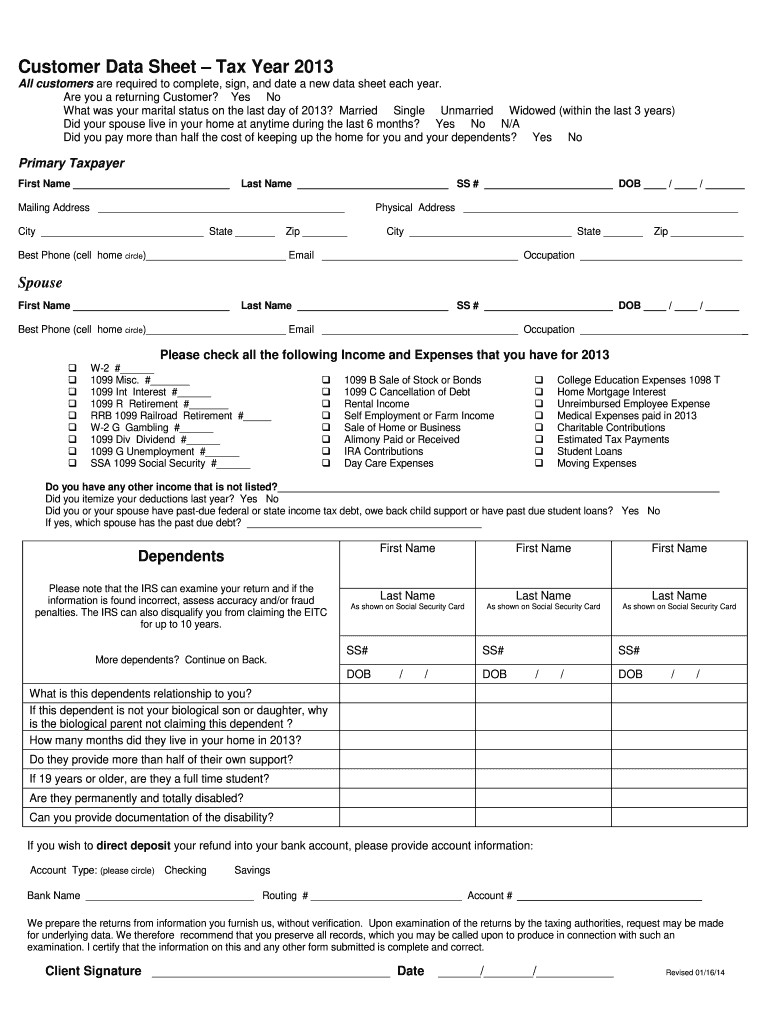
Customer Data Sheet 2025

Get Form
application data sheet 37 cfr 1 76 pdf Preview on Page 1

Here's how it works

01. Edit your application data sheet 37 cfr 1 76 pdf online
Type text, add images, blackout confidential details, add comments, highlights and more.
02. Sign it in a few clicks
Draw your signature, type it, upload its image, or use your mobile device as a signature pad.
03. Share your form with others
Send customer data sheet via email, link, or fax. You can also download it, export it or print it out.

How to use or fill out Customer Data Sheet with our platform

Form edit decoration
9.5
Ease of Setup
DocHub User Ratings on G2
9.0
Ease of Use
DocHub User Ratings on G2
  1. Click ‘Get Form’ to open the Customer Data Sheet in the editor.
  2. Begin by indicating if you are a returning customer by selecting 'Yes' or 'No'.
  3. Fill in your marital status on the last day of 2013 by choosing from the options provided.
  4. Complete the Primary Taxpayer section with your first name, last name, Social Security number, date of birth, mailing address, and contact information.
  5. If applicable, provide your spouse's details in the Spouse section using the same format as above.
  6. Check all relevant income and expenses for 2013 from the list provided. Ensure accuracy as this information is crucial for tax purposes.
  7. List any dependents along with their details such as names, Social Security numbers, and relationships to you.
  8. If you wish to direct deposit your refund, fill in your bank account information accurately.
  9. Finally, review all entries for completeness and accuracy before signing and dating the form at the bottom.

Start filling out your Customer Data Sheet today for free using our platform!

See more Customer Data Sheet versions

We've got more versions of the Customer Data Sheet form. Select the right Customer Data Sheet version from the list and start editing it straight away!
Versions Form popularity Fillable & printable
2013 4.8 Satisfied (282 Votes)
be ready to get more

Complete this form in 5 minutes or less

Get form

Got questions?

We have answers to the most popular questions from our customers. If you can't find an answer to your question, please contact us.
Contact us
A client information sheet is a document that collects and organizes essential details about a client. It serves as a reference for businesses, service providers and organizations to maintain accurate records and improve customer interactions.
Avoid duplicating or contradicting information across different formats, and use templates or automation tools to save time and ensure quality. Life is what you make it. To document client contact effectively and efficiently: Use a CRM System: Centralize all client interactions in a CRM for easy access and tracking.
Depending on your specific needs, this might include: The clients name and contact details. Information about their company and its industry. Specific information about what they need from you. Business contract details.
They typically contain a name, email address, phone number, company name and website. Customer records could also include information about purchase history, interaction with your website and emails, birthday and other information that would be necessary for communication and future sales.
Creating an Effective Fact Sheet: Steps Step 1: Define Your Purpose. Defining the purpose of your fact sheet is crucial. Step 2: Identify Your Audience. Step 3: Gather Pertinent Data. Step 4: Format Your Fact Sheet. Step 5: Design for Readability. Step 6: Review and Edit. Step 7: Disseminate Your Fact Sheet.

People also ask

A data sheet is a document that offers comprehensive information about a product, service, solution or event. A data sheet includes your brand logo, product name and critical specifications. They typically showcase information using tables, bullet lists and icon visualizations.

intersight datasheet