




Here's how it works

01. Edit your form online
Type text, add images, blackout confidential details, add comments, highlights and more.

02. Sign it in a few clicks
Draw your signature, type it, upload its image, or use your mobile device as a signature pad.

03. Share your form with others
Send it via email, link, or fax. You can also download it, export it or print it out.
How to use or fill out New Hire Packet - HROI with our platform

- Click 'Get Form' to open the New Hire Packet - HROI in the editor.
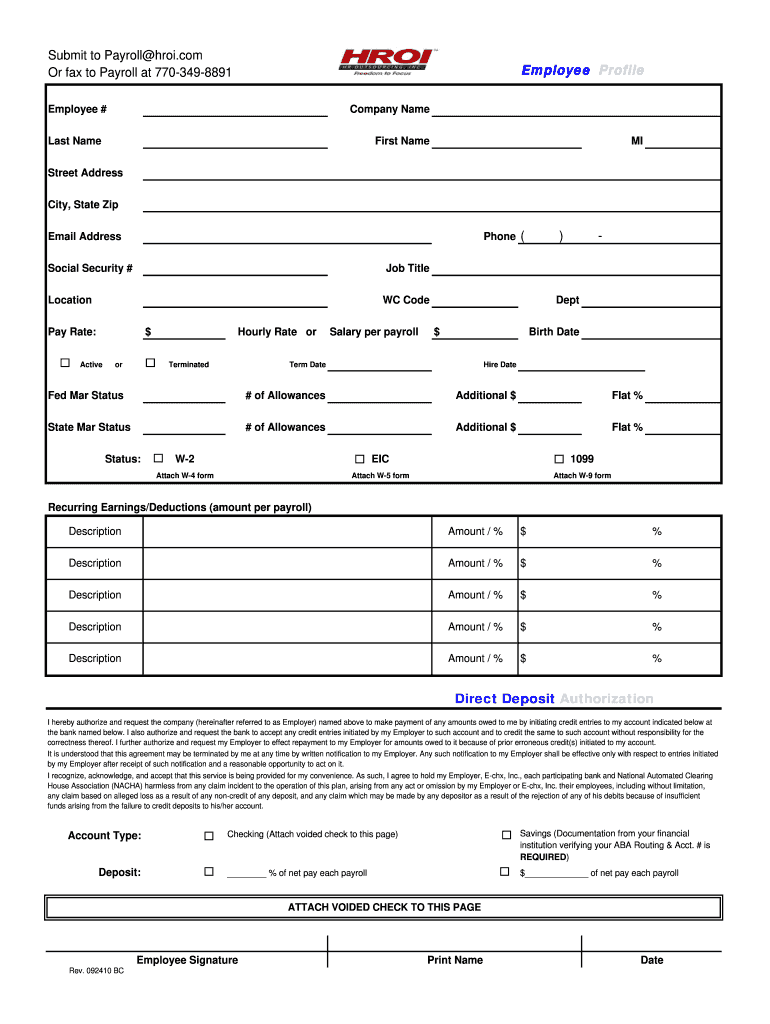
- Begin by filling out the Employee Profile section. Enter your Employee Number, Company Name, Last Name, First Name, and Middle Initial. Ensure that your Street Address, City, State, Zip Code, Phone Number, and Email Address are accurate.
- Next, provide your Social Security Number and Job Title. Specify your Location and WC Code. Input your Pay Rate as either an Hourly Rate or Salary per payroll.
- Complete the sections regarding your employment status (Active or Terminated) and provide your Birth Date along with Hire Date and Term Date if applicable.
- Fill in the Federal and State Marital Status sections along with the number of allowances you wish to claim. Attach any required forms such as W-4 or W-5 as indicated.
- For Direct Deposit Authorization, select your account type (Checking or Savings) and enter the necessary details including percentage or dollar amount for deposits.
- Finally, review all entered information for accuracy before signing and dating the form at the bottom.
Start using our platform today to streamline your New Hire Packet - HROI completion!
Fill out New Hire Packet - HROI online
It's free
Security and compliance
At DocHub, your data security is our priority. We follow HIPAA, SOC2, GDPR, and other standards, so you can work on your documents with confidence.
Learn more


