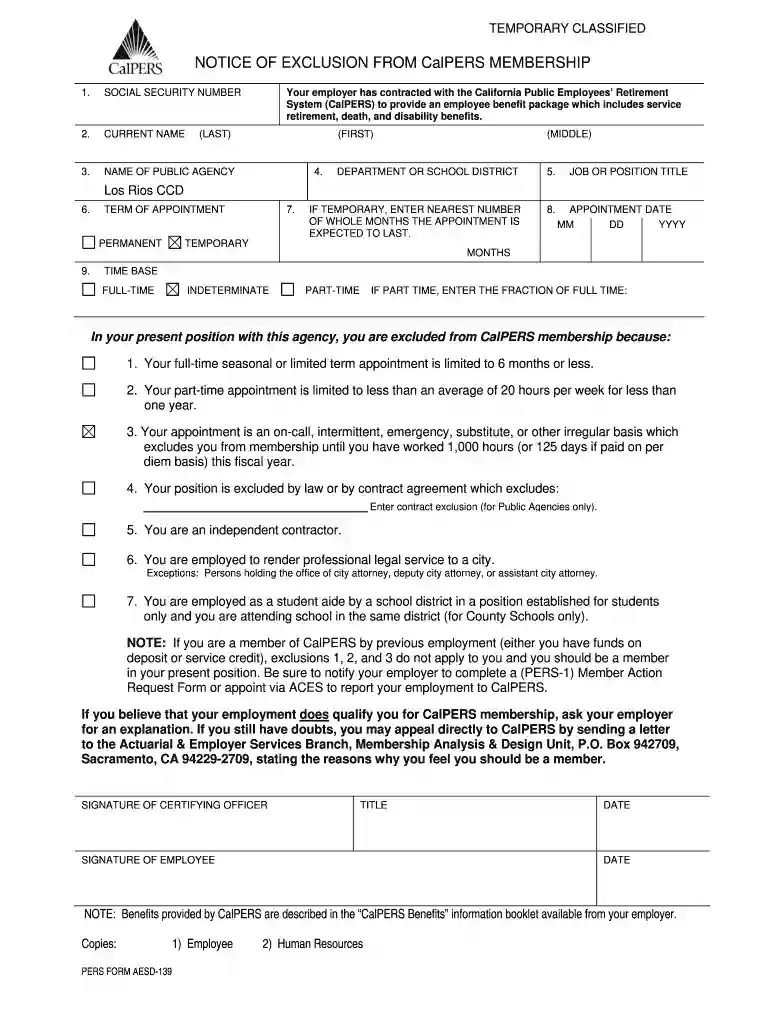
Notice of exclusion from calpers membership 2026

Get Form
notice of exclusion from calpers membership Preview on Page 1

Here's how it works

01. Edit your notice of exclusion from calpers membership online
Type text, add images, blackout confidential details, add comments, highlights and more.

02. Sign it in a few clicks
Draw your signature, type it, upload its image, or use your mobile device as a signature pad.

03. Share your form with others
Send calpers notice of exclusion form via email, link, or fax. You can also download it, export it or print it out.

How to use or fill out notice of exclusion from calpers membership with our platform

Form edit decoration
9.5
Ease of Setup
DocHub User Ratings on G2
9.0
Ease of Use
DocHub User Ratings on G2
  1. Click ‘Get Form’ to open it in the editor.
  2. Begin by entering your Social Security Number in the designated field. This is crucial for identification purposes.
  3. Fill in your current name, including last, first, and middle names as required.
  4. Specify the name of your public agency and department or school district where you are employed.
  5. Indicate your job or position title clearly to ensure accurate representation of your role.
  6. If your appointment is temporary, enter the nearest number of whole months expected for the appointment duration.
  7. Provide the appointment date in the format DD/MM/YYYY.
  8. Select whether your term of appointment is permanent or temporary and specify if part-time, including the fraction of full time if applicable.
  9. Review the reasons for exclusion from CalPERS membership listed on the form and ensure you understand which applies to you.
  10. Finally, sign and date the form at the bottom, ensuring all information is accurate before submission.

Start using our platform today to fill out your notice of exclusion from CalPERS membership easily and for free!

See more notice of exclusion from calpers membership versions

We've got more versions of the notice of exclusion from calpers membership form. Select the right notice of exclusion from calpers membership version from the list and start editing it straight away!
Versions Form popularity Fillable & printable
2011 4.7 Satisfied (26 Votes)
be ready to get more

Complete this form in 5 minutes or less

Get form

Got questions?

We have answers to the most popular questions from our customers. If you can't find an answer to your question, please contact us.
Contact us
Regardless of the reason you separate, when you permanently leave CalPERS-covered employment you have options regarding the contributions in your account. Take a lump-sum refund or rollover. Leave the contributions and interest in your account.
If you return to work for a CalPERS employer in a permanent part-time or full-time position, you must reinstate from retirement into active employment. This means: You become an active CalPERS member again. You can retire again later.
Elect a Refund of Contributions Receive your accumulated contributions as a direct deposit or rollover. Electing a refund terminates your CalPERS membership. Ensure youre aware of any tax implications.
Your appointment is an on call, intermittent, emergency, substitute, or other irregular basis which excludes you from membership until you have worked 1,000 hours (or 125 days if paid on per diem basis) in a fiscal year (July 1-June 30).
provisions in the PERL to allow for cancellation of membership prior to separation from the elected/appointed position. You must complete a separate election form for each term served electing optional membership, even if the position(s) are with the same employer.

Security and compliance

At DocHub, your data security is our priority. We follow HIPAA, SOC2, GDPR, and other standards, so you can work on your documents with confidence.

Learn more

People also ask

More In Retirement Plans Yes, an employee can affirmatively elect not to have automatic enrollment contributions deducted from his or her wages. Generally, an employee can decline participation in an automatic contribution arrangement by following the procedures in the notice the employer gives to the employee.
To be eligible for service retirement, you must have at least five years of CalPERS-credited service and be at least age 50, 52, or 55 depending on your retirement formula .

Related links