Type text, add images, blackout confidential details, add comments, highlights and more.
02. Sign it in a few clicks
Draw your signature, type it, upload its image, or use your mobile device as a signature pad.
03. Share your form with others
Send timesys via email, link, or fax. You can also download it, export it or print it out.
How to use or fill out timesys workers comp with our platform
Ease of Setup
DocHub User Ratings on G2
Ease of Use
DocHub User Ratings on G2
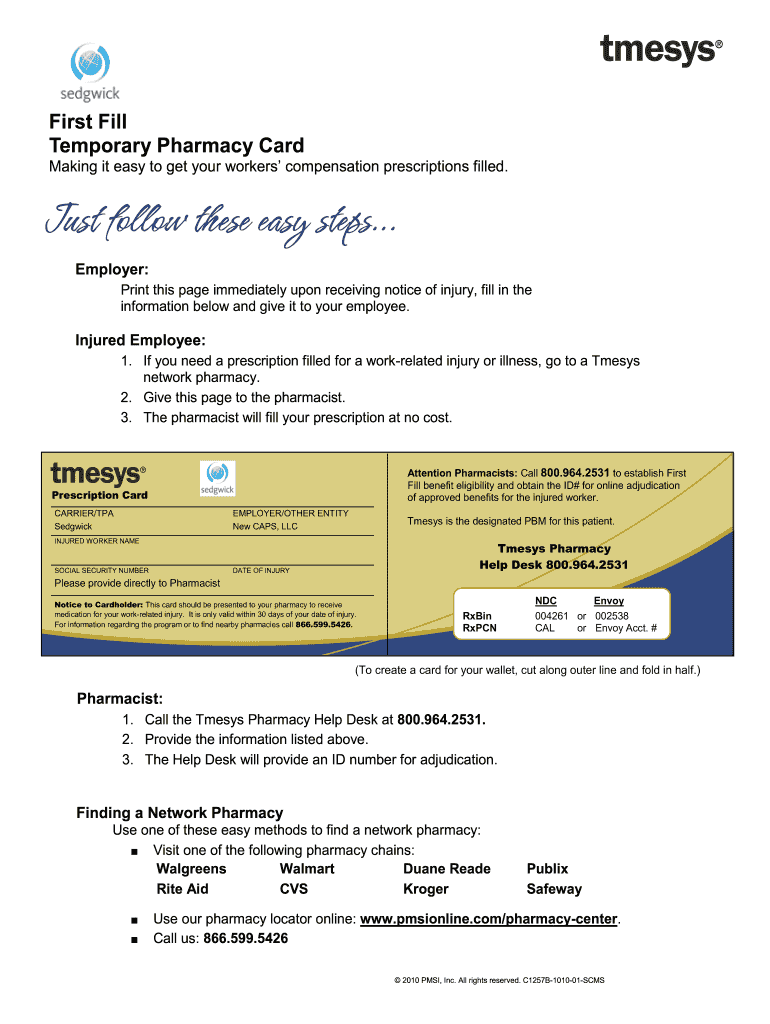
Click ‘Get Form’ to open the timesys workers comp document in the editor.
Begin by filling in the 'Employer' section with your company's name and details. This is crucial for identifying the responsible party for the claim.
In the 'Injured Employee' section, enter the employee's name and social security number. Ensure accuracy as this information is vital for processing claims.
Record the 'Date of Injury' accurately. This date is essential for determining eligibility and timelines related to benefits.
Provide any additional required information, such as RxBin and NDC numbers, which are necessary for pharmacy processing.
Once all fields are completed, review your entries for accuracy before saving or sharing the document directly from our platform.
Start using our platform today to streamline your timesys workers comp form completion!
A couple small time sys admins caught in the net. And of course a bunch of skip traces and assorted crooks for the clients. The clients were a long list ofRead more
Legal Status and Use of Seals and Logos. The seal of the National Archives and Records Administration. (NARA) authenticates the Code of Federal RegulationsRead more
Cookie consent notice
This site uses cookies to enhance site navigation and personalize your experience.
By using this site you agree to our use of cookies as described in our Privacy Notice.
You can modify your selections by visiting our Cookie and Advertising Notice.