Employer intent employ 2026

Get Form
code virginia Preview on Page 1

Here's how it works

01. Edit your code virginia online
Type text, add images, blackout confidential details, add comments, highlights and more.
02. Sign it in a few clicks
Draw your signature, type it, upload its image, or use your mobile device as a signature pad.
03. Share your form with others
Send virginia title company via email, link, or fax. You can also download it, export it or print it out.

How to use or fill out employer intent employ with our platform

Form edit decoration
9.5
Ease of Setup
DocHub User Ratings on G2
9.0
Ease of Use
DocHub User Ratings on G2
  1. Click ‘Get Form’ to open the employer intent employ document in the editor.
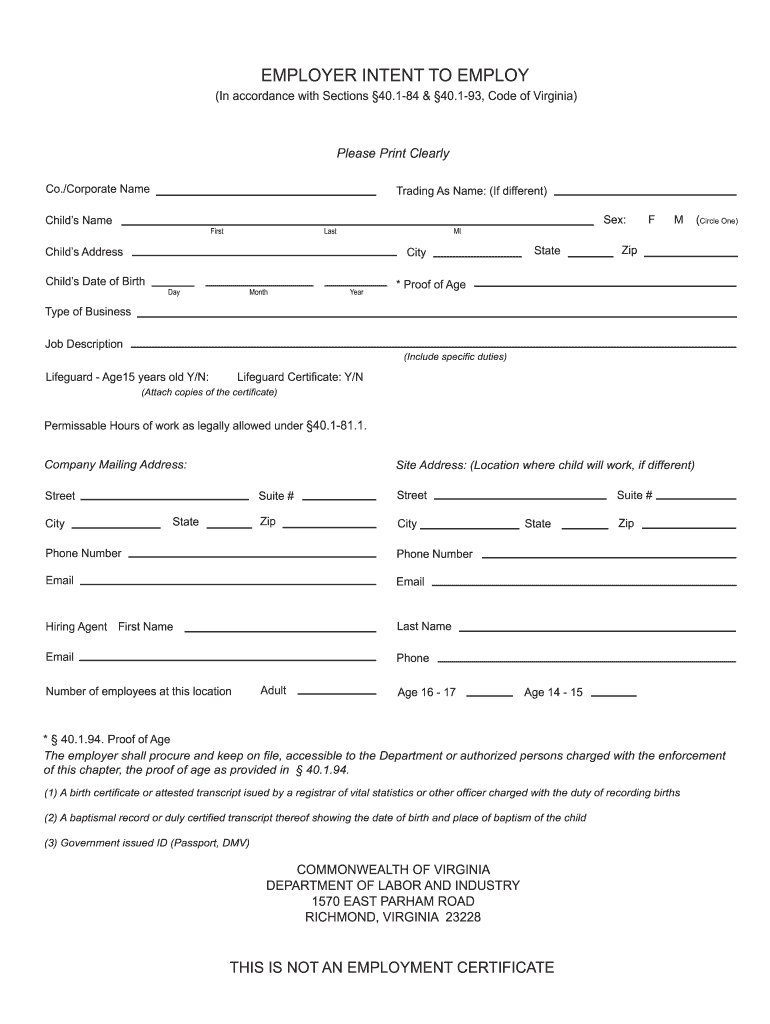
  2. Begin by entering the Co./Corporate Name and Trading As Name if applicable. Ensure clarity for easy identification.
  3. Fill in the Child’s Name, including First and Last names, followed by their Address, City, State, and Zip Code.
  4. Provide the Child’s Date of Birth by selecting Day, Month, Year, and indicate their Sex by circling F or M.
  5. Specify the Type of Business and Job Description. Include specific duties expected from the child.
  6. Indicate if the child is a Lifeguard aged 15 years old and whether they possess a Lifeguard Certificate. Attach copies as required.
  7. Complete sections for Company Mailing Address and Site Address where the child will work if different.
  8. Fill in contact details for the Hiring Agent including their First Name, Phone Number, and Email.
  9. Lastly, provide information on the number of employees at this location categorized by age groups.

Start filling out your employer intent employ form today for free using our platform!

be ready to get more

Complete this form in 5 minutes or less

Get form

Got questions?

We have answers to the most popular questions from our customers. If you can't find an answer to your question, please contact us.
Contact us
If you approve an employee for FMLA leave, you must: Protect your employees job while on FMLA leave. Maintain their access to group health benefits. Not retaliate or discriminate against an employee for taking FMLA leave.
FMLA abuse occurs when an employee misrepresents the need for leave or uses approved leave in a way that contradicts the condition it was granted for. The law protects employees who use leave for qualifying reasons, but it does not shield those who provide false information or misuse medical certifications.
Thus, this case demonstrates that an employee cannot have it both ways the employee cannot decline to use FMLA (even if the leave qualifies for FMLA) and then try to hide behind FMLA protections after the fact. Accordingly, once an employee declines to use FMLA, the employee assumes the risk of the decision.
There are many reasons not to hire someone, including poor qualifications, lack of experience, negative references, or a poor cultural fit. Employers need to evaluate how well a candidate matches the job requirements and company values before making a decision.
Under both FMLA and CFRA, it is unlawful for an employer to retaliate against you for taking protected leave. This includes firing you, demoting you, cutting your hours, or otherwise punishing you for exercising your rights.

Security and compliance

At DocHub, your data security is our priority. We follow HIPAA, SOC2, GDPR, and other standards, so you can work on your documents with confidence.

Learn more
ccpa2
pci-dss
gdpr-compliance
hipaa
soc-compliance
be ready to get more

Complete this form in 5 minutes or less

Get form

People also ask

Medical and Disability-Related Leave If no accommodations are possible, an employer can require a leave of absence under laws like the Family and Medical Leave Act (FMLA) or California Family Rights Act (CFRA), which provide up to 12 weeks of job-protected leave.

employer intent employ