




Here's how it works



How to use or fill out Champaign County Clerk Small Estate Affidavit

- Click ‘Get Form’ to open the Small Estate Affidavit in our editor.
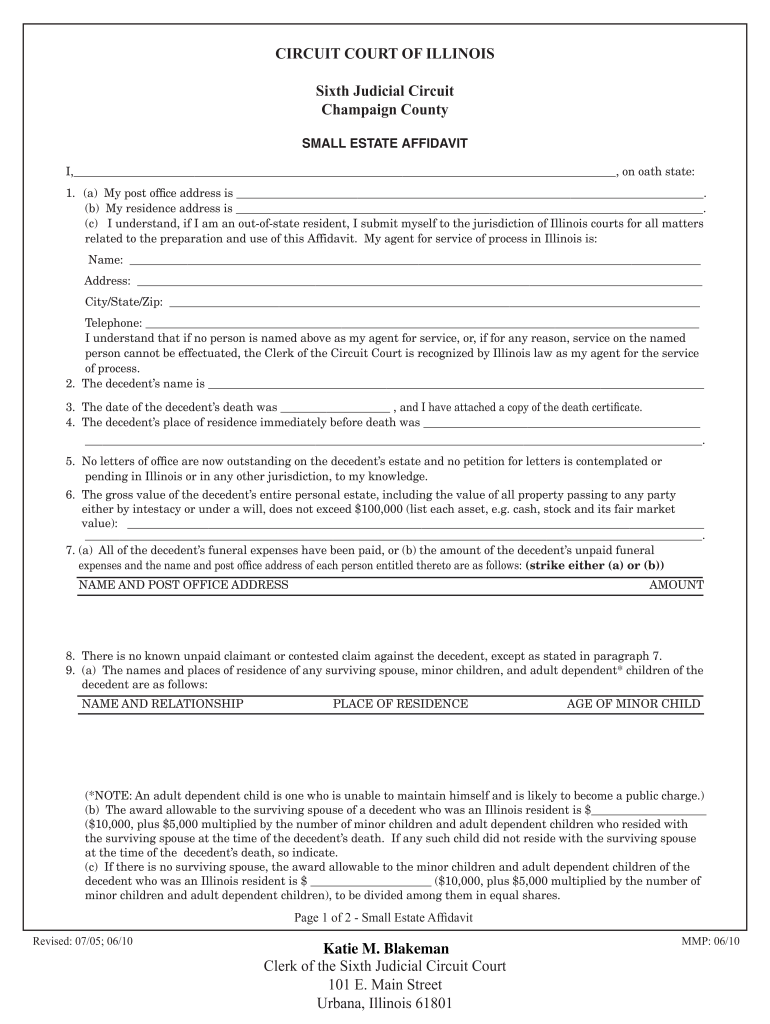
- Begin by entering your name and post office address in the designated fields. Ensure accuracy as this information is crucial for identification.
- Provide the decedent's name, date of death, and place of residence before death. Attach a copy of the death certificate as required.
- Indicate whether there are any outstanding letters of office on the decedent’s estate and list the gross value of their personal estate, ensuring it does not exceed $100,000.
- Complete sections regarding funeral expenses and any known claimants against the estate. Be thorough to avoid delays.
- Finally, review all entries for accuracy, sign the affidavit, and submit it through our platform for processing.
Start filling out your Small Estate Affidavit today for free using our platform!
It's free
See more champaign county clerk versions
| Versions | Form popularity | Fillable & printable |
|---|---|---|
| 2010 | 4.8 Satisfied (300 Votes) |
Got questions?
How can I send my champaign county clerk from Google Drive for signing?
If you often work with documents stored in your Google Drive, DocHub is a perfect solution for you to easily and quickly complete, edit, and sign them. This editor integrates well with Google apps, so you can export your champaign county clerk from your Google Drive to the editor without the need of downloading and re-uploading it. Right-click on your file, choose Open With → DocHub PDF Sign and Edit. In our editor, add and assign Signature Fields for all people involved, then click on the Menu button above → Send → select how you want to share your form.
How do you create an e-signature for the champaign county clerk election results 2022 on iOS?
Apart from an extensive toolset for editing PDFs on mobile phones, DocHub allows you to sign your champaign county clerk election results 2022 along the way. Open our editor in your browser, make changes using DocHub’s toolset, and complete your editing by eSigning the finished form.
How much does it cost to get a copy of a birth certificate in Illinois?
How do I get a certified copy of my birth certificate from Il?
What is Urbana Champaign known for?
Security and compliance
At DocHub, your data security is our priority. We follow HIPAA, SOC2, GDPR, and other standards, so you can work on your documents with confidence.
Learn more


