Upmc prior auth form 2026

Get Form
health plan Preview on Page 1

Here's how it works

01. Edit your health plan online
Type text, add images, blackout confidential details, add comments, highlights and more.
02. Sign it in a few clicks
Draw your signature, type it, upload its image, or use your mobile device as a signature pad.
03. Share your form with others
Send upmc health services via email, link, or fax. You can also download it, export it or print it out.

How to use or fill out UPMC Prior Auth Form with DocHub

Form edit decoration
9.5
Ease of Setup
DocHub User Ratings on G2
9.0
Ease of Use
DocHub User Ratings on G2
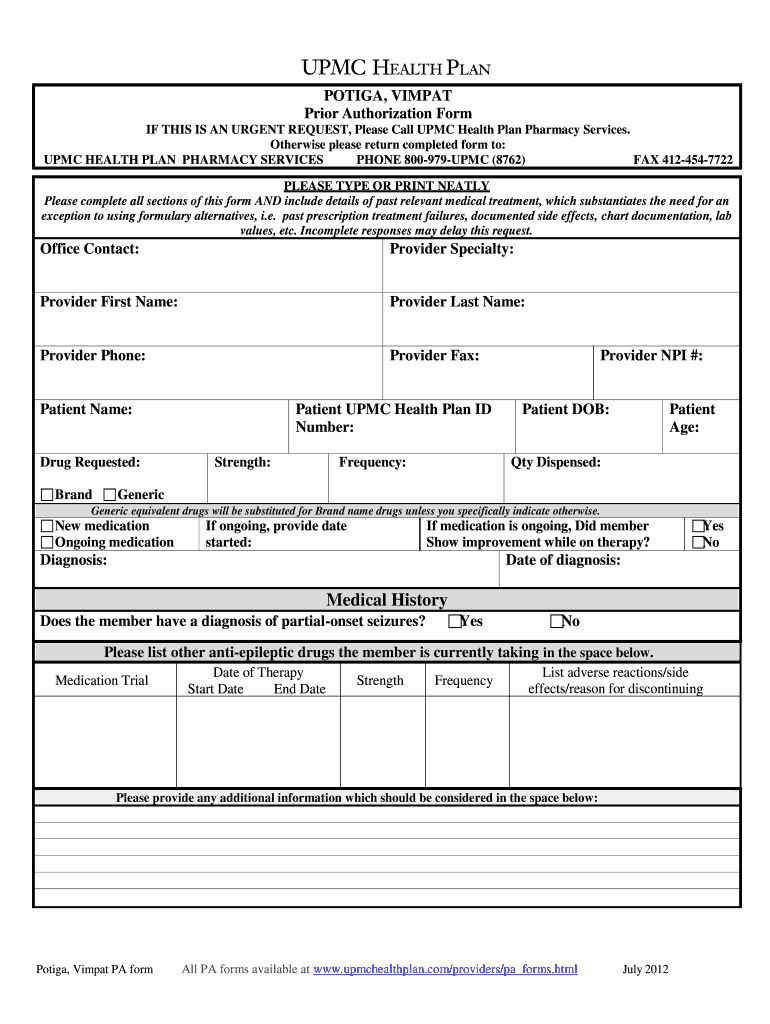
  1. Click ‘Get Form’ to open the UPMC Prior Authorization Form in our platform's editor.
  2. Begin by filling out the 'Office Contact' section, including the provider's specialty, first and last name, phone number, and fax number. Ensure all information is accurate to avoid delays.
  3. Next, complete the patient information fields: Patient Name, UPMC Health Plan ID Number, Date of Birth, Age, and Drug Requested. Specify the strength and frequency of the medication as well.
  4. Indicate whether the medication is new or ongoing. If ongoing, provide the start date and confirm if there was any improvement while on therapy.
  5. Fill in the diagnosis details and answer whether the member has a diagnosis of partial-onset seizures. List any other anti-epileptic drugs currently being taken.
  6. Document any medication trials by providing start and end dates along with strength and frequency. Include any adverse reactions or reasons for discontinuation.
  7. Finally, provide any additional information that should be considered in the designated space before submitting your completed form.

Start using our platform today to streamline your form completion process for free!

See more upmc prior auth form versions

We've got more versions of the upmc prior auth form form. Select the right upmc prior auth form version from the list and start editing it straight away!
Versions Form popularity Fillable & printable
2012 4.8 Satisfied (252 Votes)
be ready to get more

Complete this form in 5 minutes or less

Get form

Got questions?

We have answers to the most popular questions from our customers. If you can't find an answer to your question, please contact us.
Contact us
Many prior authorization requests are processed in 1 to 3 business days, especially for standard medications with properly completed paperwork. Some insurance companies may take up to 5 to 7 days as part of their normal process.
Studies show the average cost for prior authorization approval on primary care practices ranged from $2,161 to $3,430 annually per full-time physician. In addition to the impact on physicians, prior authorization requirements have been found to harm patient care.
UPMC Health Plan requires a prior authorization request for specific procedures or treatments to determine whether coverage of a request will be approved or denied.
How To Get Prior Authorization: Step-by-Step Guide Step 1: Check client eligibility. Step 2: Determine if a code or service requires Prior Authorization. Step 3: Find and complete forms. Step 4: Submit a PA request. Step 5: Check the status of an authorization.
To receive coverage for a medication requiring prior authorization, you can: Ask your healthcare provider to submit the request. Your healthcare provider can submit the request online, by fax or phone by accessing our providers prior authorization information. Submit your own prior authorization request.

Security and compliance

At DocHub, your data security is our priority. We follow HIPAA, SOC2, GDPR, and other standards, so you can work on your documents with confidence.

Learn more
ccpa2
pci-dss
gdpr-compliance
hipaa
soc-compliance
be ready to get more

Complete this form in 5 minutes or less

Get form

People also ask

You can submit a request on your own. Find the appropriate prescription drug or medical procedure authorization form for your situation.

upmc prior auth form