




Here's how it works



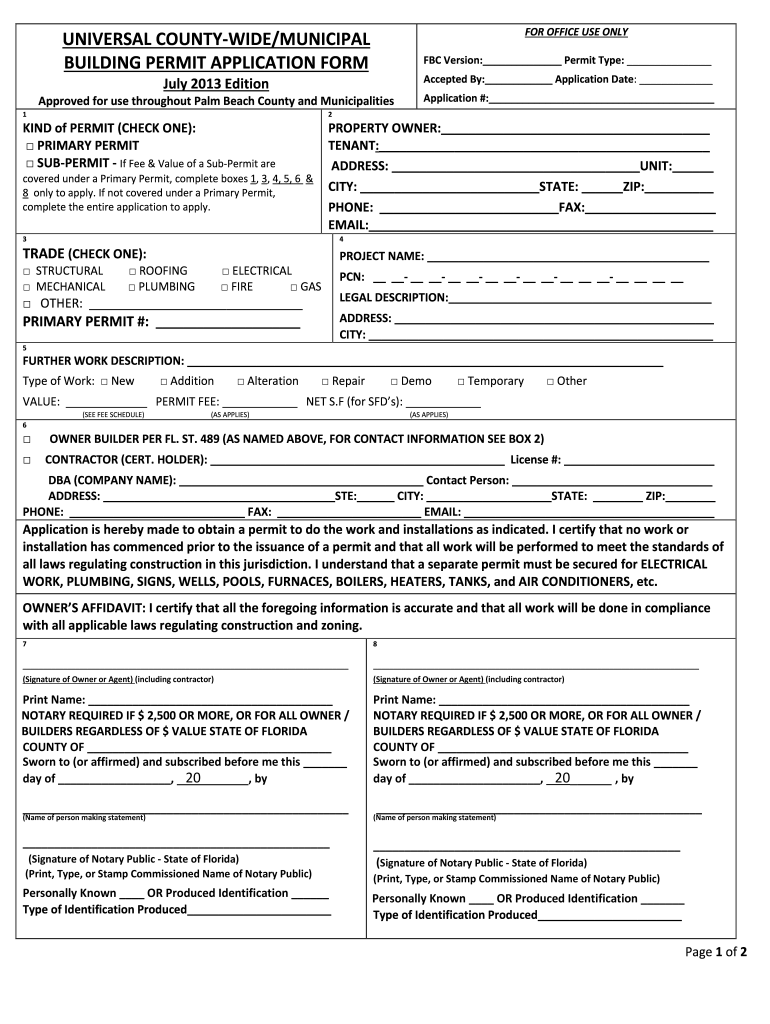
How to use or fill out universal county wide municipal building permit application form

- Click ‘Get Form’ to open it in the editor.
- Begin by filling in the 'Property Owner' and 'Tenant' sections with the respective names. Ensure that you provide a complete address, including unit number, city, state, and zip code.
- Select the type of permit you are applying for by checking either 'Primary Permit' or 'Sub-Permit'. If applying for a Sub-Permit, only complete boxes 1, 3, 4, 5, 6 & 8.
- Indicate the trade type by checking one of the options such as Structural, Mechanical, Roofing, etc. Fill in the project name and legal description accurately.
- Provide a detailed description of the work being done in the 'Further Work Description' section. Specify if it is new construction, an addition, alteration, repair, or other types of work.
- Complete the contractor information if applicable. This includes their name, license number, company name (DBA), and contact details.
- Finally, ensure all signatures are obtained where required and that any necessary notarization is completed before submission.
Start using our platform today to streamline your building permit application process for free!
It's free
See more universal county wide municipal building permit application form versions
Got questions?
Can I type my eSignature on my palm beach county universal permit application?
Sure, a typed name is recognized as a valid electronic signature when you add it to your paperwork utilizing a compliant solution like DocHub. Simply upload your palm beach county universal permit application to our editor, click Sign in the top tool pane → Create your signature → Type your name in the proper tab, and select how it will look on your document.
How do you complete universal county wide municipal online?
You may complete and sign your universal county wide municipal on the internet, even on a tight deadline. All you need to access top-notch editing instruments on any device is a DocHub profile, that you can sign up in a few moments. After you register, upload your document or find what you are searching for in our catalog, complete it utilizing the editing instruments you need, and place your electronic signature on it at the end.
Security and compliance
At DocHub, your data security is our priority. We follow HIPAA, SOC2, GDPR, and other standards, so you can work on your documents with confidence.
Learn more


