




Here's how it works



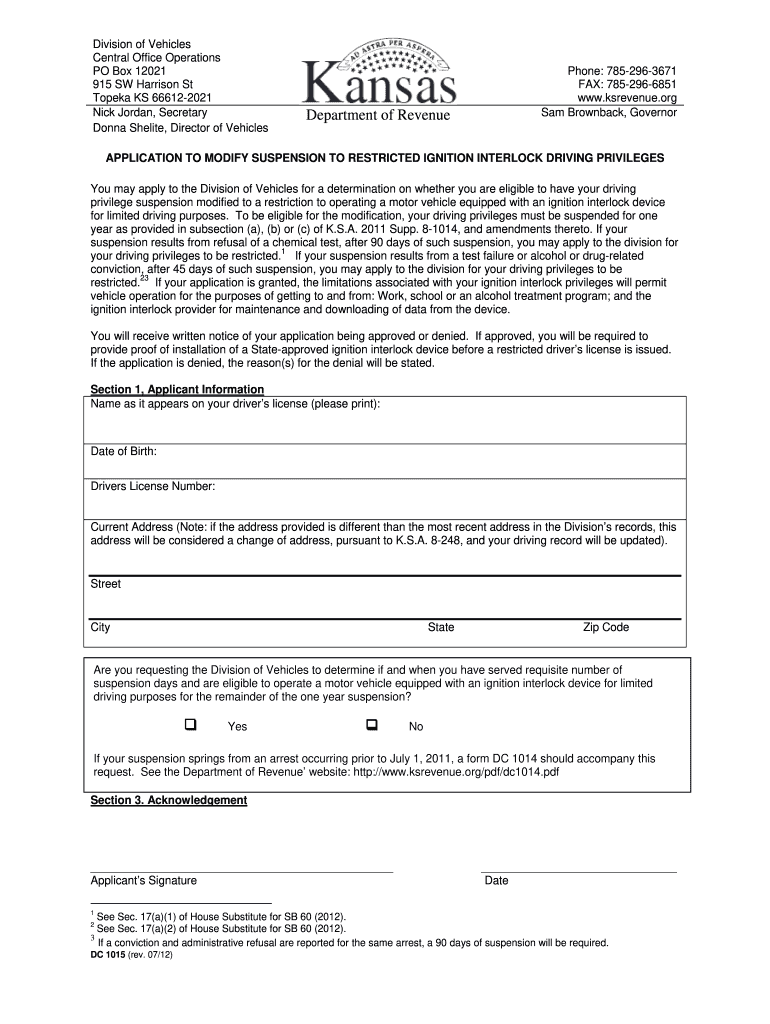
How to use or fill out DC 1015 Rev 07012012. Application to Modify a Current Driver's License Suspension

- Click ‘Get Form’ to open it in the editor.
- Begin with Section 1, Applicant Information. Fill in your name as it appears on your driver’s license, date of birth, and driver's license number. Ensure that your current address is accurate, as discrepancies may update your records.
- In Section 2, indicate whether you are requesting a determination on your eligibility for restricted driving privileges by selecting 'Yes' or 'No'.
- Sign and date the application in Section 3 to acknowledge the information provided is true.
- Follow the mailing instructions in Section 4. Include the required payment of $100 via money order or check made payable to the Division of Vehicles.
- Review Section 5 for additional information regarding eligibility and requirements before submitting your application.
Start using our platform today to complete your application quickly and efficiently!
It's free
See more DC 1015 Rev 07012012. Application to Modify a Current Driver's License Suspension versions
Got questions?
How do I sign my restricted license kansas for free?
Most eSignature services require users to have a paid subscription. With DocHub, there are two options for you to add an electronic signature to your restricted license kansas without being charged:
- You can do it during a 7-day trial period;
- You can subscribe to a free plan.
The second option, though, has limitations on the number of signatures, sign requests, emails, and documents for adjusting available per month. You can check for full details here.
How do you fill out kansas restricted license online?
You can find and modify your kansas restricted license online by using DocHub. Its straightforward but feature-rich design allows you to begin productive work right after you register your account. Create your profile and add your file, then our user interface will guide you through our stress-free form completion experience.
Security and compliance
At DocHub, your data security is our priority. We follow HIPAA, SOC2, GDPR, and other standards, so you can work on your documents with confidence.
Learn more


