cutler bay permit search Preview on Page 1

Alarm registration cutler bay form 2026

Here's how it works

  • 01. Edit your cutler bay permit search online

    Type text, add images, blackout confidential details, add comments, highlights and more.

  • 02. Sign it in a few clicks

    Draw your signature, type it, upload its image, or use your mobile device as a signature pad.

  • 03. Share your form with others

    Send it via email, link, or fax. You can also download it, export it or print it out.

How to use or fill out alarm registration cutler bay form with our platform

Form edit decoration
9.5
Ease of Setup
DocHub User Ratings on G2
9.0
Ease of Use
DocHub User Ratings on G2
  1. Click ‘Get Form’ to open the alarm registration Cutler Bay form in the editor.
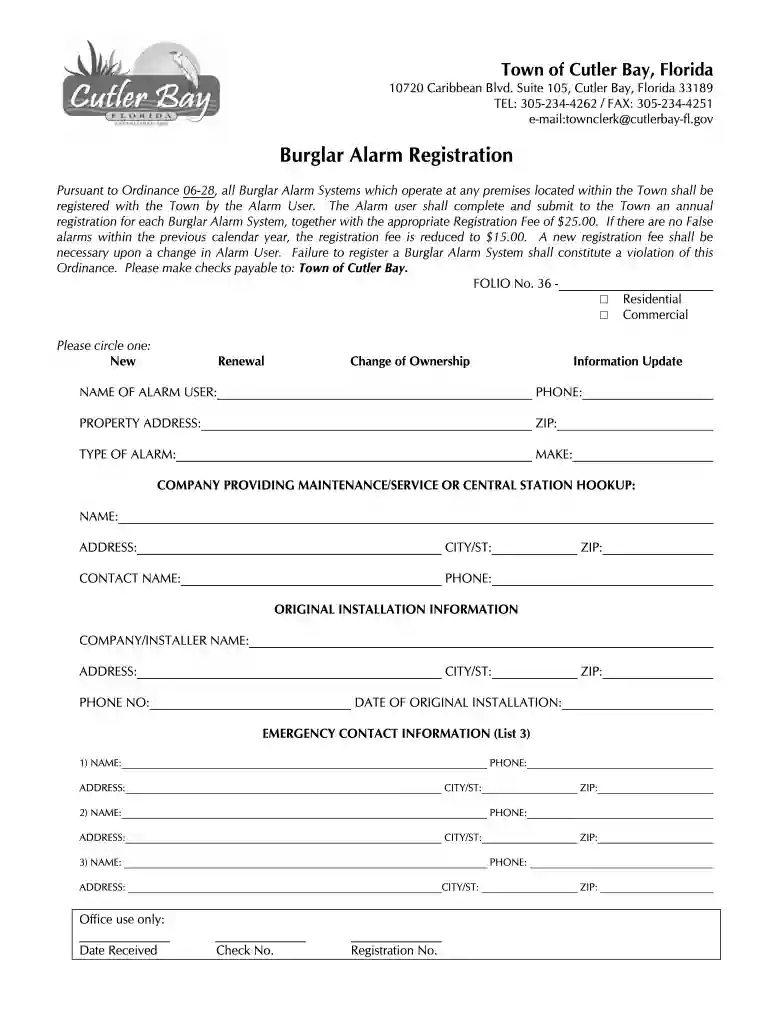
  2. Begin by selecting whether your alarm system is for Residential or Commercial use by circling the appropriate option.
  3. Indicate if this is a New registration, Renewal, Change of Ownership, or Information Update by circling the relevant choice.
  4. Fill in your name as the Alarm User along with your phone number and property address, ensuring all details are accurate.
  5. Specify the type and make of your alarm system in the designated fields.
  6. Provide information about the company that maintains or services your alarm system, including their name, address, city/state, contact name, and phone number.
  7. Complete the original installation information section with details about the installer company, including their name, address, city/state, phone number, and installation date.
  8. List three emergency contacts with their names, phone numbers, addresses, and city/state for quick reference.

Start filling out your alarm registration form online for free today!

be ready to get more

Complete this form in 5 minutes or less

Got questions?

We have answers to the most popular questions from our customers. If you can't find an answer to your question, please contact us.

For any burglar alarm system not currently registered with us, you must complete and submit an Alarm Permit Registration Form, renew annually, and pay the appropriate fee. Renewal fee: $15 if the burglar alarm system had no false burglar alarms requiring police dispatch during the prior registration period.
Registration forms may be obtained by calling (248) 526-5119 or via e-mail to: alarms@troymi.gov. A $25.00 registration fee is required at the time the registration form is filed. The commercial alarm user registration fee is $25.00 for either a fire alarm or security alarm system, or $50.00 for both.
OPERATING AN ALARM SYSTEM WITHOUT A PERMIT: ANY PERSON OR ENTITY OPERATING AN ALARM SYSTEM WITHOUT A PERMIT IS SUBJECT TO A FEE OF $75.00 FOR EACH FALSE ALARM. In addition to the fee, a citation may be issued and a fine imposed by the Justice of the Peace Court for operating an alarm system without a permit.
Renew online Renew an application. Permits can be renewed up to 30 days in advance by paying the $25 renewal fee before the expiration date. Permit issuance. Once approved, the applicant is emailed a renewed copy of the alarm permit.
Select a chart to view: Burden RankStateFees 6 Nevada $1,608 7 California $579 8 Hawaii $694 9 Arizona $59629 more rows

Security and compliance

At DocHub, your data security is our priority. We follow HIPAA, SOC2, GDPR, and other standards, so you can work on your documents with confidence.

Related links

Cutler Bay Campus

The CBT Technology Institute Cutler Bay Campus is located in the Point Royale Shopping Center at the northeast corner of Marlin Road and South Dixie Highway.Read more

Learn more
Burglar Alarm Registration | Town of Cutler Bay Florida

The burglar alarm registration is $25 for the time period beginning from January 1 through December 31 each year, and the fee is prorated by month.Read more

Learn more
THE COMPUTER DIRECTORY

In applications requiring more than 1 Form C contact, a multicontact relay may be used instead of 2, 3 or 4 of the standard type HG Mercury-Wetted ContactRead more

Learn more
If you believe that this page should be taken down, please follow our DMCA take down process here