

Obtén todo lo necesario para completar y certificar Instructions for school districts - Effingham County Schools 2026 ahora

Obtener impreso
Instructions for school districts - Effingham County Schools Vista previa en la página 1

Así es como funciona

01. Edita el impreso online
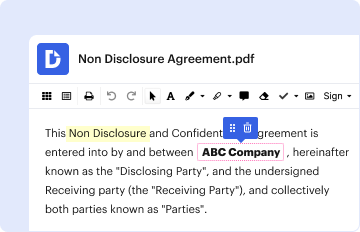
Escribe texto, añade imágenes, oculta detalles privados, añade comentarios, resalta y más.
02. Firma en pocos clics
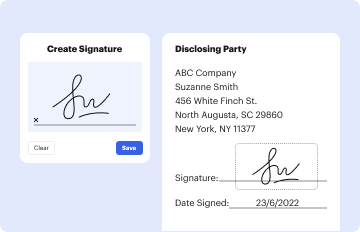
Dibuja tu firma, escríbela, sube su imagen o utiliza tu dispositivo móvil como tableta de firma.
03. Comparte tu impreso con otros
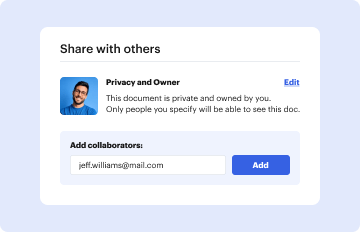
Envíalo por correo electrónico, enlace o fax. O lo puedes descargar, exportar o imprimir.

Su manera rápida y segura de modificar y certificar Instructions for school districts - Effingham County Schools en línea

Form edit decoration
9.5
Fácil configuración
Valoración de DocHub en G2
9.0
Fácil uso
Valoración de DocHub en G2

La opción de editar fácilmente Instructions for school districts - Effingham County Schools y otros documentos similares es imprescindible en el mundo actual. Y sin la solución adecuada orientada a la seguridad, este proceso puede ser inmensamente frustrante y, además, arriesgado. DocHub está diseñado para quitarle la complicación a la tarea de completar y firmar documentos. Proporciona todas las herramientas que necesita para rellenar Instructions for school districts - Effingham County Schools usted mismo o enviarlo de forma segura a varios destinatarios con solo unos pocos clics.

Utilice este tutorial para rellenar y modificar el archivo Instructions for school districts - Effingham County Schools sin complicaciones:

  1. En la página del formulario, haga clic en Obtener formulario para abrirlo en el editor.
  2. Comience por rellenar los campos editables haciendo clic en ellos y escribiendo el texto.
  3. Haga clic en el icono A para añadir nuevo texto y cambiar fuente, tamaño y color.
  4. En su Panel de control, encuentre otras herramientas para anotar y modificar Instructions for school districts - Effingham County Schools, como dibujar (🖋️), resaltar (🖍️), borrar texto (🗞️), etc.
  5. Haga clic en la herramienta de comentarios (💬) para añadir un comentario lateral en el documento.
  6. En la esquina superior derecha, seleccione la opción para descargar, compartir o enviar por correo electrónico su copia a las partes designadas.

La gestión de firmas electrónicas es igual de sencilla. Siga estos pasos para certificar y enviar su Instructions for school districts - Effingham County Schools para su firma:

  1. En la misma barra de herramientas, encuentre el botón FirmarCrear su firma.
  2. Elija cómo desea firmar electrónicamente Instructions for school districts - Effingham County Schools, cree su firma electrónica y guarde los cambios.
  3. Haga clic en Firmar otra vez → elija su firma de la lista desplegable → certifique Instructions for school districts - Effingham County Schools con su firma.
  4. En la esquina superior izquierda, seleccione Gestionar campos (📄), haga clic en el campo de firma, arrástrelo hacia su documento y utilice nuestra configuración en el lado izquierdo para configurar y enviar Instructions for school districts - Effingham County Schools para su firma.
  5. Supervise el estado de finalización de su documento desde su Panel de control.

Complete, certifique y apruebe sus documentos de la manera más sencilla posible. Pruebe DocHub ahora y optimice el flujo de trabajo de completado en DocHub mientras garantiza la seguridad de su información en línea.

preparate para conseguir más

Rellena este impreso en 5 minutos o menos

Obtener impreso

¿Tienes alguna pregunta?

Tenemos respuestas a las preguntas más frecuentes de nuestros clientes. Si no encuentras respuesta a tu pregunta, ponte en contacto con nosotros.
Contacto

With DocHub, you can quickly approve your Instructions for school districts - Effingham County Schools or any other document on iOS, even without setting up extra programs. You can access your DocHub account from any internet-connected browser and complete and sign your form in any preferred method with just a couple of clicks.

If you edit your Instructions for school districts - Effingham County Schools with DocHub, you simply will not need to look for other software or solutions to sign it. An electronic signature is a component of DocHub’s substantial editing toolset, which allows you to apply changes in your form without switching between websites. Simply complete your form, double-check the correctness of your information and place your electronic signature at the end to make it submission-ready quickly.

Academic Calendar 2023-2024 July 26 August 2Pre-Planning for TeachersAugust 3First Day of School / First Day of the First Nine WeeksSeptember 4LABOR DAY NO SCHOOLSeptember 8Issue First Nine Weeks Progress ReportsOctober 4PARENT TEACHER CONFERENCES Students Dismissed Early28 more rows
The Effingham Unit 40 Board of Education Monday voted to change the grading scale, effective with the coming school year. The new scale will be: A--90 to 100; B--80-89; C--70-79; D--60-69and F--59 and lower.
Blandford Elementary School. 4650 Mccall Rd, Rincon, GA 31326. Ebenezer Elementary School. 1198 Ebenezer Rd, Rincon, GA 31326. Ebenezer Middle School. 1100 Ebenezer Rd, Rincon, GA 31326. Effingham County Middle School. Guyton Elementary School. Marlow Elementary School. Rincon Elementary School. Sand Hill Elementary School.

Seguridad y cumplimiento

En DocHub, la seguridad de tus datos es nuestra prioridad. Seguimos HIPAA, SOC2, GDPR y otros estándares, para que puedas trabajar en tus documentos con confianza.

Aprende más
ccpa2
pci-dss
gdpr-compliance
hipaa
soc-compliance

La gente también pregunta

No denim jeans, skirts, shorts, etc. Shorts, skorts, skirts, and jumpers must be no more than 4 inches above the bend in the back of the knee. Skinny jeans/pants are not acceptable. Tops must be solid white or black polo (accepted at all schools) or the second color selected by the schools uniform committee.
We have eight elementary schools spread across the county, and each one is dedicated to promoting positive growth and encouraging strong educational values.
Car drop-off begins at the front of the school and buses unload students at the rear of the school. Students are allowed to be dropped off starting at 7:30. These students will sit in the cafeteria till the bell rings for them to go to class at 8:00. Breakfast is served in the cafeteria.
For now, Effingham schools will use the 90/80/70/60 scale with a 4.0 unweighted GPA while still using pluses and minuses.
7:15 a.m. -2:35 p.m.

Enlaces Relacionados