
Insert signature in jpg smoothly




How to insert signature in jpg with no hassle

Whether you are already used to working with jpg or handling this format the very first time, editing it should not feel like a challenge. Different formats may require particular apps to open and edit them properly. Nevertheless, if you have to swiftly insert signature in jpg as a part of your typical process, it is advisable to find a document multitool that allows for all types of such operations without extra effort.
Try DocHub for sleek editing of jpg and also other document formats. Our platform offers effortless papers processing no matter how much or little prior experience you have. With all instruments you have to work in any format, you will not have to jump between editing windows when working with every one of your papers. Easily create, edit, annotate and share your documents to save time on minor editing tasks. You will just need to sign up a new DocHub account, and then you can start your work instantly.
Take these simple steps to insert signature in jpg
- Visit the DocHub site, locate the Create free account button on its home page, and click on it to start your registration.
- Enter your email address and make up a secure password. You can also make use of your Gmail account to fast-forward the signup process.
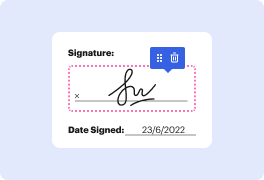
- Once done with registration, go to the Dashboard and add your jpg for editing. Upload it from your device or use the link to its location in the cloud storage.
- Click on the added document to open it in the editor and then make all changes you have in mind utilizing our tools.
- Complete|your revision by saving your file or downloading it on your computer. You can also instantly send it to a dedicated recipient in the DocHub tab.
See an improvement in document management efficiency with DocHub’s simple feature set. Edit any document easily and quickly, irrespective of its format. Enjoy all the advantages that come from our platform’s simplicity and convenience.
PDF editing simplified with DocHub






Drive efficiency with the DocHub add-on for Google Workspace
Got questions about jpg signature?
How can I add a signature to a JPEG online for free?
How do I convert a JPEG to e-signature?
How do I add a digital signature to a photo?
Can JPG file be digitally signed?
How do I create a signature for a JPEG?
How can I put my signature on a picture?
How do I add a signature to a JPEG?
See why our customers choose DocHub


Security and compliance
At DocHub, your data security is our priority. We follow HIPAA, SOC2, GDPR, and other standards, so you can work on your documents with confidence.
Learn more


